Reports until 13:27, Monday 29 July 2019
H1 CAL (CAL)
timesh.mistry@LIGO.ORG - posted 13:27, Monday 29 July 2019 - last comment - 03:18, Tuesday 29 October 2019(50894)
NCAL -- MEDM Screen Interface

[Jeff Kissel, Timesh Mistry]
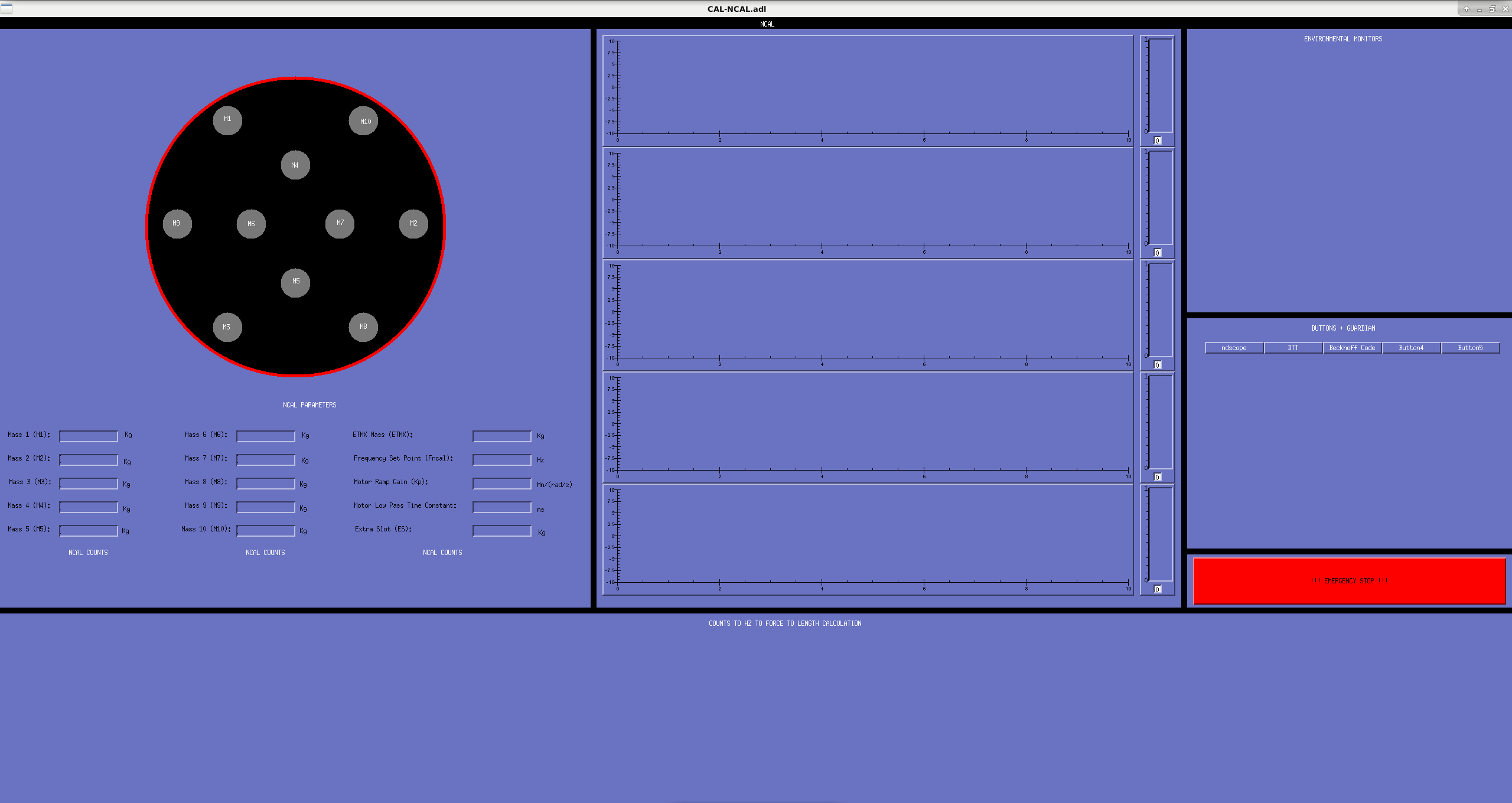
I have started drawing up an MEDM screen and a screenshot is attached to this alog. Furthermore, the screen is committed to the SVN at the following location: /opt/rtcds/userapps/release/cal/common/medm/CAL_NCAL_OVERVIEW.adl
 
Starting on the left hand side there is cartoon drawing of the NCAL with the mass positions displayed. The masses are labelled M1-M10 corresponding to the number we use for the mass allocation in the rotor. The red ring around the black disk will indicate whether the NCAL is on or off. When the NCAL is on, this red disk will be green. The NCAL masses can be entered underneath the NCAL image as well as the frequency set point, gain and low pass setting for the Beckhoff motor. There are readback positions (black boxes) for the Beckhoff counts, the NCAL frequency as a conversion from counts to frequency and the frequency as measured by analysis of the sawtooth signal.
 
I now draw your eyes to the middle section. There are 5 Cartesian plots with scale monitors to the right of them. The idea is to have a time series stream of the signal of the frequencies (see above para.), current/volts draw from the Beckhoff and any other time stream we care about (maybe accelerometers). The scale monitors will help as a visual guide for the streams of data much the way we use them for the violin monitors.
 
Proceeding right once more, there is a section that has the title 'ENVIRONMENT MONITORS'. This will hold readback for data such as temperature( XVEA, test mass etc), test mass position, etc. I'm not sure what other environment monitors we would like however, as the project evolves, this section will become more populated.
 
Lowering your gaze, you will see a section titled 'BUTTONS + GUARDIAN'. This is where there will be useful buttons for opening DTT templates, ndscope traces, viewing Beckhoff code etc. Although we are not  planning on automating anything at this stage, eventually we will want to and I think having a space ready for it is a good thing (i.e. attempting to future proof the MEDM screen).
 
Underneath this, we have the big red button. This will force stop the NCAL by turning off the power to the NCAL chassis. I put this in as a contingency however, if this is deemed as overkill then it can always be removed.
 
Last but not least, there is the section at the bottom of the screen titled 'COUNTS TO HZ TO FORCE TO LENGTH CALCULATION'.  This is were the steps to convert the NCAL signal will be computed into length in the same manor that we do for the PCAL. I have not got the front end model build yet so when that is done, this section will be filled in. This will eventually allow us to take transfer function fo the length displacement and correlate it to other signals such as PCAL calibration lines, suspension calibration lines, environmental channels and other calibration channels.
 
This screen is subject to change, most notably, for increased IOC for beckhoff and environmental monitors.
Images attached to this report
Comments related to this report
timesh.mistry@LIGO.ORG - 03:18, Tuesday 29 October 2019 (52758)CAL

I have included the MEDM screen into the main sitemap. I did this by:

a) Checked the /opt/rtcds/userapps/release/cds/h1/medm directory to make sure SITEMAP.adl is checked in and the latest version

timesh.mistry@zotws22: svn st
?       H1CDS_DAQ_LARGE_OVERVIEW_CUST.ui
?       H1CDS_DAQ_MICRO_CUST.ui
?       H1CDS_FE_MICRO_CAL_CUST.ui
?       H1CDS_FE_MICRO_CUST.ui
?       H1CDS_FE_MICRO_CUST_EDC.ui
?       H1CDS_HWWD_NODE.ui
?       H1CDS_O3_OVERVIEW_DETAIL_CUST.ui
?       H1CDS_SLOWCTRL_MICRO_CUST.ui
?       H1CDS_SLOWCTRL_SDF_ONLY_MICRO_CUST.ui
?       H1CDS_SLOW_CONTROLS_CUST.ui
?       H1CDS_WAP_MINISCULE_CUST.ui

timesh.mistry@zotws22: svn info SITEMAP.adl
Path: SITEMAP.adl
Name: SITEMAP.adl
Working Copy Root Path: /opt/rtcds/userapps/trunk/cds
URL: https://redoubt.ligo-wa.caltech.edu/svn/cds_user_apps/trunk/cds/h1/medm/SITEMAP.adl
Relative URL: ^/trunk/cds/h1/medm/SITEMAP.adl
Repository Root: https://redoubt.ligo-wa.caltech.edu/svn/cds_user_apps
Repository UUID: e3bfa956-ff0e-4416-9af7-00b7a258cde5
Revision: 20245
Node Kind: file
Schedule: normal
Last Changed Author: jeffrey.kissel@LIGO.ORG
Last Changed Rev: 20245
Last Changed Date: 2019-09-12 15:18:38 -0700 (Thu, 12 Sep 2019)
Text Last Updated: 2019-09-12 15:18:38 -0700 (Thu, 12 Sep 2019)
Checksum: ad7d77597efd5becbf2a3ac9655584594439b084

b) Modified X-Arm CAL (in the Labe/Name/Args field) to have an additional display that points to the NCAL MEDM screen that is located at:
/opt/rtcds/userapps/release/cal/common/medm/CAL_NCAL_OVERVIEW.adl
Display label is set to NCALX and Arguments is copied over from the PCALX field above it in.

c) Saved and exited the MEDM editor for sitemap. Open sitemap in execute mode and verified that the screen appears in a drop down menu X-Arm CAL as well as checked the NCALX and PCALX screen work as normal.

d) Committed the changes

timesh.mistry@zotws22: svn ci -m "Updated SITEMAP.adl to include /opt/rtcds/userapps/release/cal/common/medm/CAL_NCAL_OVERVIEW.adl for the NCALX MEDM screen as am option under X-Arm CAL. I have checked that the screen opens as normal and other screens (such as PCALX) are not affected by this change." SITEMAP.adl
Sending        SITEMAP.adl
Transmitting file data .done
Committing transaction...
Committed revision 20427.
timesh.mistry@zotws22: