jeffrey.kissel@LIGO.ORG - posted 16:59, Wednesday 04 September 2019 (51737)
Temporary Extra PCAL Lines Surrounding 60 Hz for Linear and Non-Linear Subtraction Test
J. Kissel

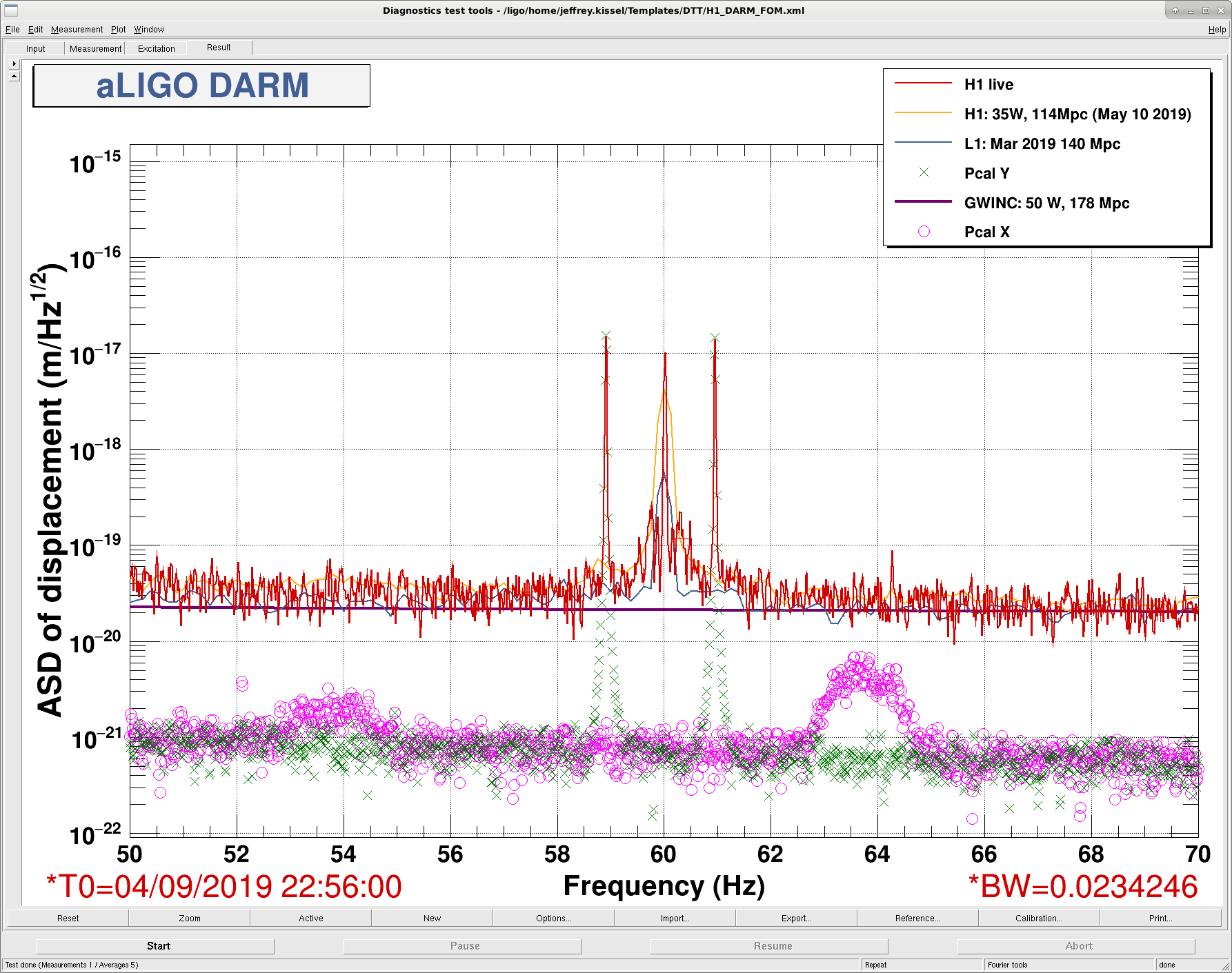
At the tail end of today's calibration suite, I gathered a bit of time with PCALY driving near the 60 Hz power main line in the DARM ASD, in the region where we have been regularly performing offline linear and non-linear subtraction. The idea being that, if we apply the subtraction techniques, and exclude the PCALY excition channel from the list of subtracted witnesses, then we want to see the surrounding noise be subtracted away without impacting PCAL. No expects this to go awry, but it's nice gold-plated proof that the subtraction is doing good and no bad.

There are two times in this study: first with the PCAL lines just outside the typical non-linear junk we typically see surrounding 60 Hz, and the second with the PCAL lines right on top of the junk.
During these times, the IFO was otherwise in its nominal configuration, with no other tests going on. Indeed, we didn't have to modify any existing PCALY calibration lines in order to ask this extra amplitude of the PCAL's OFS AOM driver -- i.e. these extra lines didn't saturate the optical follower servo.

(All times are with the date 2019-Sep-04, and reported in HH:MM:SS)
    Time of Test                 Duration      PCALY f1   PCALY f2      Amplitude
                  (22:48:36 UTC, done with CAL measurements, request back to NOMINAL_LOW_NOISE)
                  (~22:50 to ~22:54 UTC tuning frequencies and amplitudes)
    22:55:00 to 23:10:00 UTC       15 mins       58.91 Hz   60.95 Hz      200 ct
                  (switched line frequencies at 23:10:13 UTC)
    23:11:00 to 23:28:00 UTC       17 mins       59.69 Hz   60.35 Hz      200 ct
                  (lines turned off at 23:28:34 UTC, Observing by 23:29:46 UTC)

The amplitude was chosen such that the amplitude of the PCAL lines roughly matched the amplitude of the 60 Hz line in DELTAL_EXTERNAL.
In retrospect, I guess to really test the algorithms, I should have chosen amplitudes roughly at the amplitude of the junk, but... c'est le vie.
The test is trivial, so easily repeatable.

To subtract these excitations from DARM / DELTAL_EXTERNAL / GDS-CALIB_STRAIN, use the TX or RX photodiodes measuring the light going to and from the test mass:
    H1:CAL-PCALY_RX_PD_OUT_DQ
    H1:CAL-PCALY_TX_PD_OUT_DQ

You can track / trend the frequencies, amplitudes, and ON/OFF yourself using the following EPICs settings channels:
    PCALY f1                             PCALY f2
    H1:CAL-PCALY_PCALOSC5_OSC_FREQ       H1:CAL-PCALY_PCALOSC6_OSC_FREQ
    H1:CAL-PCALY_PCALOSC5_OSC_SINGAIN    H1:CAL-PCALY_PCALOSC6_OSC_SINGAIN
    H1:CAL-PCALY_OSC_SUM_MATRIX_1_5      H1:CAL-PCALY_OSC_SUM_MATRIX_1_6
Images attached to this report