
[Sheila, Keita, TJ, Jenne]
As we were finishing relocking, the squeezer manager wasn't happy, because the SQZ_LO_LR guardian wasn't getting to its nominal state and returning True because the standard deviation of H1:SQZ-OMC_TRANS_RF3_DEMOD_RFMON was too high. In the end, we've lowered the green power slightly, and the squeezer is back, and we're ready to go to Observing after the current calibration measurement is complete. On the one hand, we apologize for the glitches that this will have caused in the calibration data (although hopefully they are short enough to not be troublesome), but on the other hand we were out of observing anyway, so we didn't actually lose observing time due to this squeezer issue.
- We tried cycling the squeezer manager by asking for No_squeezing, then asking for squeezing again, but that did not fix the problem and most of the signals on the squeezer LockingSignals 'scope were still fuzzy.
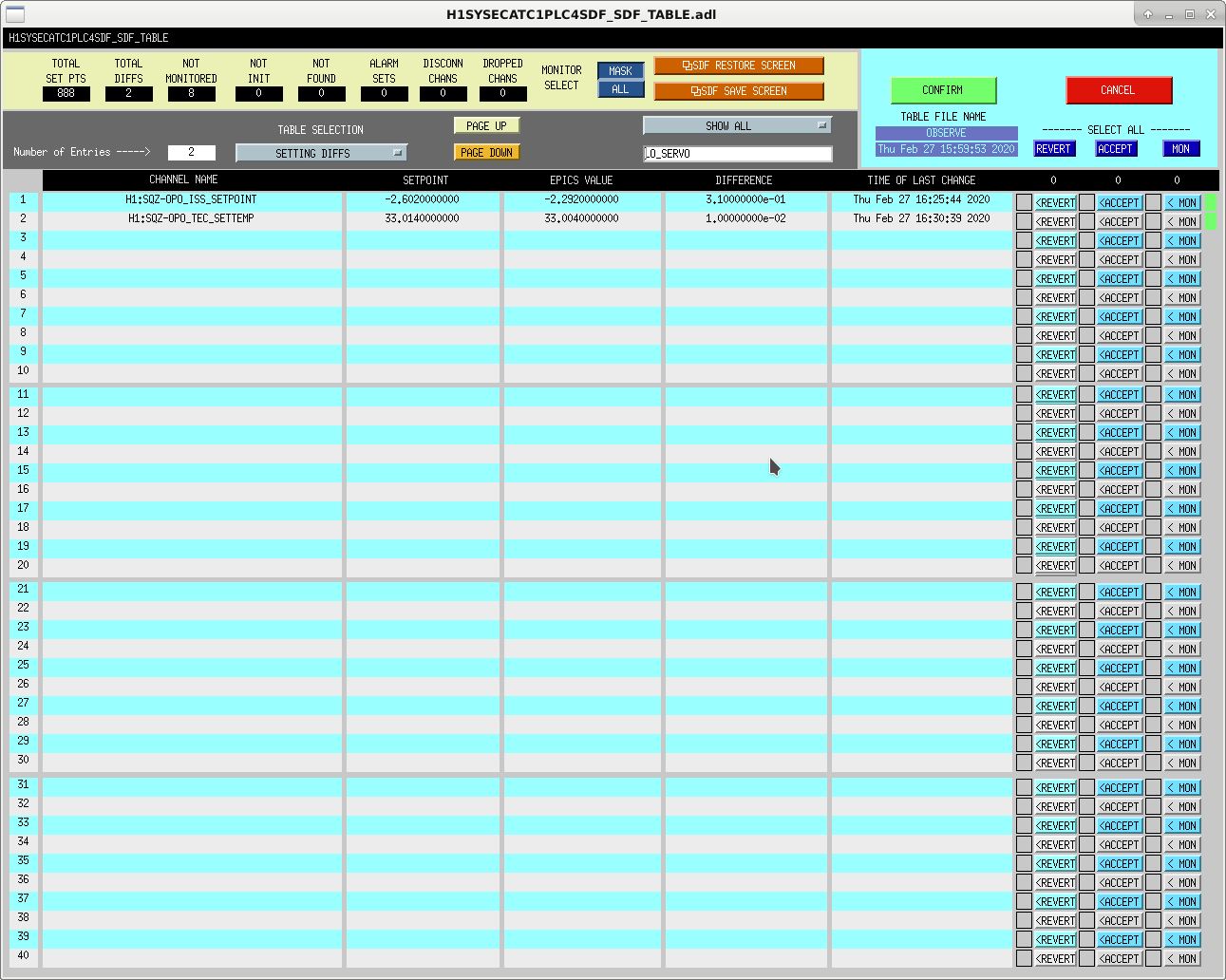
- We turned down the green power by moving the green ISS setpoint (H1:SQZ-OPO_ISS_SETPOINT) so that H1:SQZ-OPO_TRANS_DC_NORMALIZED was down to 1.2.
- Recall that Sheila recently increased this up to 1.3, although after that we started seeing these oscillations - before that time, we had been running at a value of 1.0.
- This made the oscillations go away, and increasing back to 1.3 started them again. The oscillations were gone at around 1.26, but we elected to give ourselves some elbow room and run at 1.2 for now.
- After that, Sheila showed me how to adjust the OPO temperature (since the local self heating from green power absorption is now slightly lower) to maximize the nonlinear gain.
- We took the SQZ_MANAGER guardian to LOCKED_SEED_LOW and looked at H1:SQZ-OPO_IR_PD_LF_OUT_DQ (from the nonlinear gain measurement 'scope on the squeezer screen). We also set the SQZ-SEED_PZT's scan to ENABLE. I moved the tec temperature (H1:SQZ-OPO_TEC_SETTEMP) slider in click sizes of 1e-2 to maximize the peak height of the OPO_IR_PD_LF_OUT channel. We noted that the largest we could get the peaks to was 1314 counts.
- To measure the nonlinear gain to check how things are going, we took the SQZ_MANAGER to NO_SQUEEZING and set the SQZ-OPO_PZT_1's scan to ENABLE and Yes Use Trigger (which also required clicking the Reset button), and measured the peak height of the un-amplified OPO to be 439 counts.
- This gives us a nonlinear gain of 3.
- To put things back, we requested sqz_manager to sqz_ready_ifo and then squeezing. We also put the seed PZT's scan back to disable to prevent an unneeded SDF diff.
- We accepted the 2 squeezer SDF diffs shown in the first attached screenshot, from the ISS setpoint change and the temperature change.
- We also rotated the squeezer phase by 10 degrees, to 120, to maximize our BNS range.
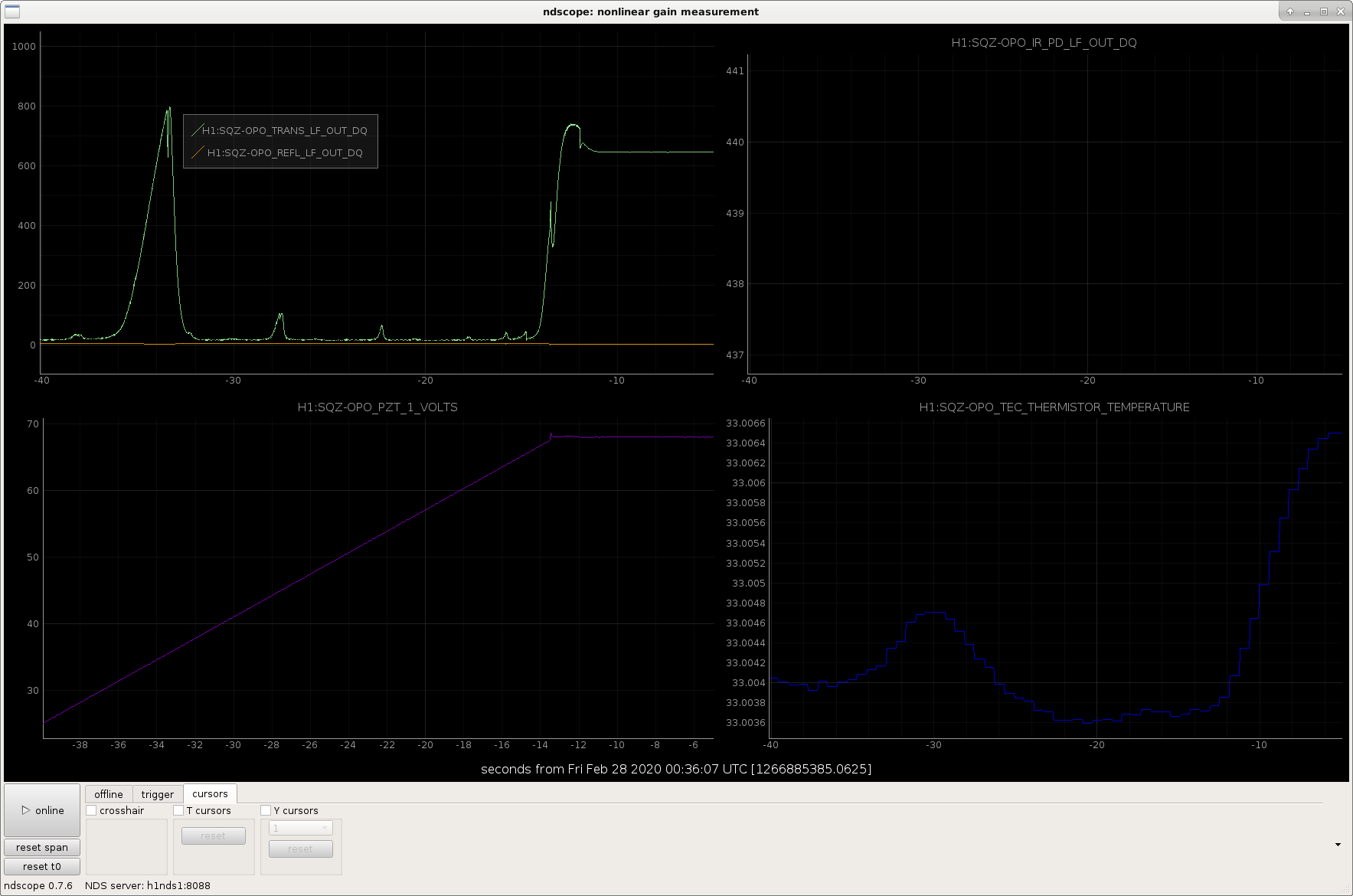
Also, when relocking the OPO Sheila noted that it looks like OPO didn't lock at the top of the peak, so Sheila is going to look at how this compares to the last time we moved the crystal to determine if we should find a new spot on the crystal during the long Tuesday maintenance. The second attached screenshot shows in the top left corner that the OPO Trans isn't at the peak after it is locked.
If the squeezer is not working sometime over night or over the weekend, and cycling the squeezer guardian doesn't fix the problem, you can try lowering the green power further so that we can get back to Observing with some squeezing, rather than having to Observe with no squeezing at all. We hope that this will not be necessary.
- Sitemap -> SQZ_OVERVIEW screen.
- Click the little blue AOM block just under the text "SHG Rejected", about 2/3 of the way down the squeezer overview screen near the left side (not to be confused with the 2 AOM blocks that are next to each other near the very bottom of the screen).
- The slider that you will adjust is in the bottom left corner of that screen, and the channel is called H1:SQZ-OPO_ISS_SETPOINT.
- Watch H1:SQZ-OPO_TRANS_DC_NORMALIZED.
- You can find this channel already on an ndscope from the SQZ Scopes button near the top right of the squeezer overview screen, locking signals, then it's in the top left panel.
- Move the ISS Setpoint slider until the OPO_trans_DC_normalized is lowered and the oscillations have stopped.
- Alog the fact that this was neccessary, screenshot, accept, and post SDF diffs, and go back to Observing.
- Commissioning team will take a look at next opportunity, and may adjust the temperature and squeezer angle.