jeffrey.kissel@LIGO.ORG - posted 10:09, Friday 28 February 2020 (55348)
UPDATED Instructions on how to turn ON (and OFF) Calibration Line Comb Test During IFO Thermalization
J. Kissel

The following are the amendments to the instructions I'd left operators to turn on (and off) a comb of new calibration lines if/when we get the chance to measure the detector's sensing function during a thermalization process. Original measurement is in LHO aLOG 53951, and failed / incomplete / errant instructions are in LHO aLOG 55297. During yesterday's attempt (LHO aLOG 55338), my instructions I'd coached folks through had led to a bit of confusion, and the DTT template I pointed to didn't exist -- which resulted in a last minute panic find of a template that didn't have excitations turned on. Blast! Not all is lost though, and we can still salvage some of the measurement. Evan will be posting the results in a bit.

Here're the updated instructions:

We only need this measurement "once more," (ha!) so please check in with me and/or Keita to see if (a) tonight / today is a good day for this measurement, or (b) we've already taken the measurement.

    (1) Wait until the ISC_LOCK guardian has acquired past MAXIMUM_POWER
    - Don't *pause* at MAXIMUM_POWER, please, let the IFO continue to nominal low noise, but start steps (2) and (3) in the ~15 minutes it takes to get from MAXIMUM_POWER to NOMINAL_LOW_NOISE.
    - It's not *imperative* when exactly you start the following *exact* when MAXIMUM_POWER finishes, but I haven't tested the robustness of the IFO against these lines at earlier stages (specifically -- between ENGAGE_SOFT_LOOPS and POWER_10W may not be able to tolerate these lines, but thus far that's anecdotal evidence).
    - It *is* imperative that you at least get steps 2 and 3 below done *before* we enter NOMINAL_LOW_NOISE.

    (2) From a terminal and run the script to turn on all the the new *PCAL* calibration lines,
    ~$ cd /ligo/svncommon/CalSVN/aligocalibration/trunk/Runs/O3/H1/Scripts/CALCS_FE
    ~$ python3.5 setup_sensingfunction_callinecombs.py

    (3) From a terminal, open up the DTT template for the DARM calibration lines, and run it.
    ~$ cd /ligo/svncommon/CalSVN/aligocalibration/trunk/Runs/O3/H1/Measurements/CALCS_FE
    ~$ diaggui 2019-12-17_H1DARMEXC_SpringMonitoring.xml
    hit "START"

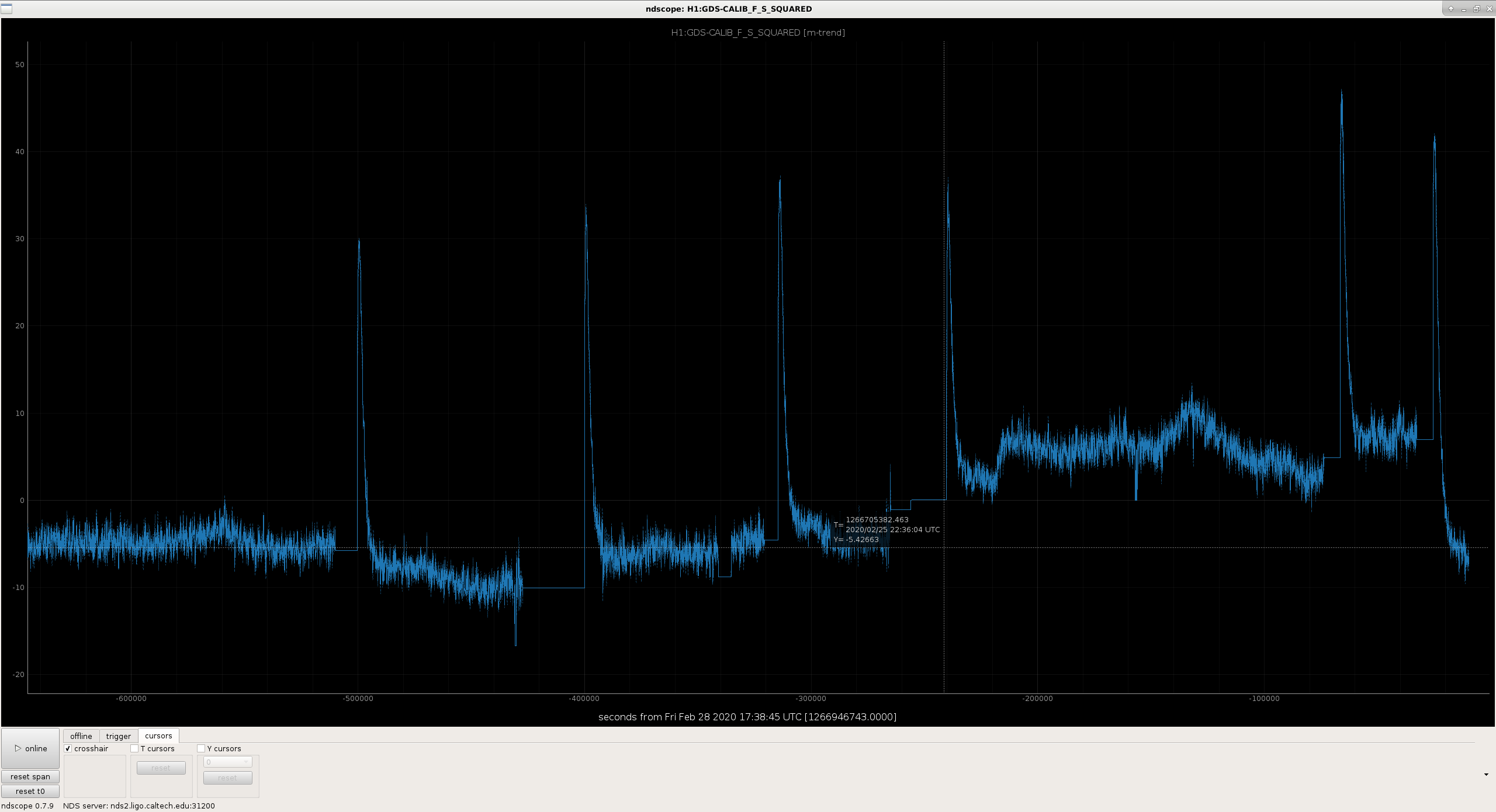
    (4) From a terminal, open up an ndscope trend of the detuned SRC, optical spring frequency (squared; aka "f_s^2"); this is your metric for "doneness" of the measurement.
    ~$ kinit albert.einstein@LIGO.ORG
    [enter your LIGO.ORG password]
    ~$ NDSSERVER=nds2.ligo.caltech.edu ndscope H1:GDS-CALIB_F_S_SQUARED -w [-7200,0]&
    - you'll have to wait *very* patiently, for these 2 hours of live 16 Hz data to populate, but, don't worry, you've got time.
    - you need to define the NDSSERVER for this ndscope call because "GDS" channels are not available to nds0 or nds1.

    (5) Watch and wait as the ISC_LOCK guardian reaches NOMINAL_LOW_NOISE, and then wait there for about 2 hours, until the detuned optical spring frequency levels out around -10 Hz^2 ***.
    *** "-10 Hz^2" is the number I thought would be typical, but apparently the thermalized value is drifting all over the place (my guess is due to static alignment differences, but I have no quantitative proof). I advise hitting "stop", and scrolling back in time to find the last few starts of NOMINAL_LOW_NOISE stretches and see what the thermalized value has been for the past few days. *That* will be your number for doneness.

    (6) While you're waiting, trend the PCALX high frequency roaming line frequency,
    ~$ ndscope H1:CAL-PCALX_PCALOSC1_OSC_FREQ -w [-7200,0]&
    and find out what it has been during the last, most recent few NOMINAL_LOW_NOISE / OBSERVATION_READY segments. Store that number; we'll call it PCALXHFLINEFREQ for use below.
    - here, you must *not* define the NDSSERVER (and /or open a new terminal), because (apparently) these EPICs channels are *not* available on nds2. Go figure.

    (7) Record the UTC times (and GPS times, if you're nice) of (a) when we hit NOMINAL_LOW_NOISE and (b) when you deem that ~2 hours is up and you begin to turn off the measurement. Grab a screenshot of the trend of f_s^2 as well.

    (8) Go through the "turn off" instructions below, and complete them. Once complete, you may return to OBSERVATION_READY, if so desired.

    (9) Write an independent aLOG (with CAL as its primary task, and OpsInfo tagged) that you've completed this measurement, and shoot an email to Jeff Kissel and Evan Goetz to let them know you've completed the measurement

Here's how to "turn off" and/or revert to *actual* NOMINAL_LOW_NOISE:
    (1) Hit "Abort" on the above DTT template.

    (2) Go to the CALEX and CALEY SDF screens and REVERT all differences. REVERT. REVERT. DO NOT ACCEPT.

    (3) Set the high frequency PCALX line back to it's most recent roaming line frequency,
    caput H1:CAL-PCALX_PCALOSC1_OSC_FREQ PCALXHFLINEFREQ

    (4) Make sure the PCAL systems are behaving nominally.
        (a) Check the PCAL MEDM overview screens, under sitemap > Xarm "CAL" or Yarm "CAL" > PCALX or PCALY. You should see a squiggly hash of noise with amplitude somewhere in between -1 and -7 Volts on the "OFS PD" channel (H1:CAL-PCALX_OFS_PD_OUTMON) strip chart that begins populating as you open up.
        (b) On that same screen, make sure the "error monitor" (H1:CAL-PCALX_OFS_ERR_OUTMON) is showing small numbers, oscillating around 0.0. Something like +/- 0.03 or less.
        (c) Make sure the "normal" PCAL lines are present on the live "aLIGO DARM" amplitude spectral density plot on the control room front wall, top middle. You should see PCALY lines at 17.1, 410.3, 1083.7, and 1153.2 Hz. You should see PCALX lines at 1153.1 Hz, and at the PCALXHFLINEFREQ frequency you just entered in step (3).
        >> If some or none of the checks in (4)(a) through (c) pass, you can try "opening and closing" the OFS loop -- i.e. toggle "Off" then "On" the "Loop Enable" switch, H1:CAL-PCALX_OPTICALFOLLOWERSERVOENABLE. If that doesn't work (i.e. it doesn't restore the PCAL system in such a way that it *then* passes the (4)(a) through (c) checks), call in a calibration expert.


Thank you!
Images attached to this report