jeffrey.kissel@LIGO.ORG - posted 14:45, Thursday 27 April 2023 (69104)
New subscreeen for QUAD_$(STAGE)_CAL_EXC Channels
J. Kissel

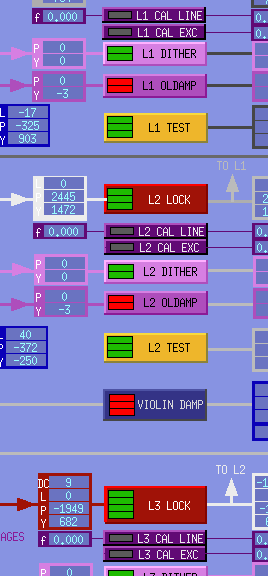
In order to reduce the layers of confusion when a "headless" command line use of the dedicated excitation channel "reserved" (named after) driving the QUADs for calibration purposes ($(IFO):SUS-$(OPTIC)_$(STAGE)_CAL_EXC) fails (e.g. what happened overnight, see LHO:69086), I've added a link to a new sub-screen underneath each of the dark purple "$(STAGE) CAL EXC" buttons (see QUAD_OVERVIEW snippit) that have never been buttons before. The new screen is quite simple, see screenshot. Perhaps most importantly, it indicates -- directly on the screen -- the exact commands to enter into a terminal to *kill* the excitation. Note, there's some smarts in that instruction set -- the "tp clear $(FEC) *" line, indeed, has an $(FEC) macro variable that updates correctly according to *which* QUAD the screen corresponds to.

The following screens,
    /opt/rtcds/userapps/release/sus/common/medm/quad/
        SUS_CUST_QUAD_ITM_OVERVIEW.adl   # Updated with link to new screen below
        SUS_CUST_QUAD_OVERVIEW.adl       # Updated with link to new screen below

        SUS_CUST_QUAD_CAL_EXC.adl        # New Screen
have been updated and/or committed to the that location in the userapps repo.
Images attached to this report