Displaying reports 39681-39700 of 88963.Go to page Start 1981 1982 1983 1984 1985 1986 1987 1988 1989 End
Reports until 12:33, Wednesday 24 July 2019
H1 CDS
david.barker@LIGO.ORG - posted 12:33, Wednesday 24 July 2019 - last comment - 13:27, Wednesday 24 July 2019(50786)
Long range dolphin operational

Richard, Fil, Rolf, Dave:

Summary: long-range Dolphin IPC data is flowing again from EY to CS  after we moved its Dolphin switch port.

Details:

Here is a summary of what we tried to get EY->CS data flowing over the past 14 hours:

rebooted h1cdsrfm

power cycled h1cdsrfm and both EX,EY Adnaco expansion chassis

power cycled EY IXS600 Dolphin switch

Checked fiber optic power to/from EY Adnaco SFP

Replaced IXH611 Dolphin card at EY with spare

Moved cdsrfm switch port from port 6 to port 4 (Fixed problem)

I'm in the process of changing the dolphin configuration to follow the port move.

Comments related to this report
jeffrey.kissel@LIGO.ORG - 12:43, Wednesday 24 July 2019 (50787)
The dolphin network was fixed (by switching the port into which the problematic card was plugged to another) by 2019-07-24 19:20 UTC.
keith.thorne@LIGO.ORG - 13:27, Wednesday 24 July 2019 (50788)
I suspect the root cause is that the end-station Dolphin switch got 'wedged' due to power glitch.  In this case it can be in a state where you can't re-enable ports.  I had this happen on the LLO DAQ test stand See TST log 12353, TST log 12338.  The cable swap work because it was to a port that had not been disabled previously (default state is enabled)
H1 PSL
corey.gray@LIGO.ORG - posted 12:06, Wednesday 24 July 2019 (50782)
PSL Chiller Water Level Top-Off (FAMIS #10519)

Crystal Chiller:  added 100mL 

Diode Chiller & both filters looked OK.

H1 PSL
jason.oberling@LIGO.ORG - posted 12:03, Wednesday 24 July 2019 - last comment - 14:53, Wednesday 24 July 2019(50776)
PSL Trip in Last Night's Thunderstorm

J. Oberling, P. King, T. Sadeki, N. Lecoeuche

This is a catch-up alog to document my involvment with recovering the PSL from the trip caused by last night's power glitch.  I should have been entering these last night as we were recovering the PSL.  I did not think to do so, and therefore left others recovering other parts of the IFO uninformed regarding PSL status.  That's entirely on me and I apologize.

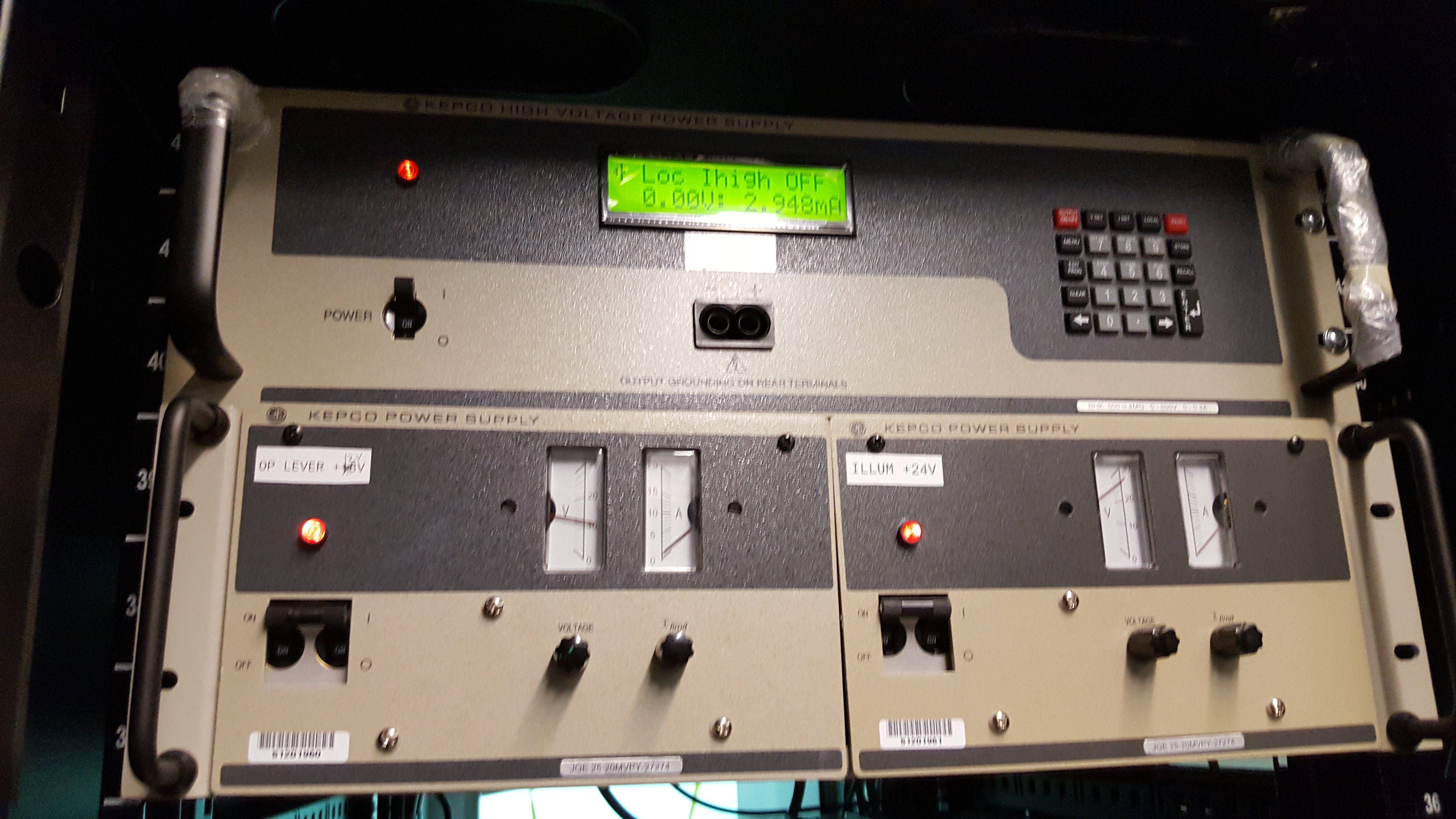
Travis called me at ~10:50pm informing me that the PSL had gone down during the thunderstorm due to an apparent power glitch, so I walked him through restarting it.  On the STAT screen we saw that the NPRO had tripped off, likely due to the glitch.  The chillers were still running nominally and the external shutter was still open, so most of the system was already ready to go and we restarted the laser without issue.  Before trying to lock the PMC, we turned off the FSS and the ISS; the FSS was turned off so it wouldn't constantly be driving the NPRO to attempt to lock the RefCav (which it couldn't do since we had no PMC), and we turned the ISS OFF as, with no PMC there was no light on the ISS PDs, so the loop was oscillating.  This done, we attempted to lock the PMC, but no luck.  As Dave was still recovering from the Dolphin crash and it was nearing the end of Travis's shift, we decided to wait until attempting to lock the PMC.  In the interim I tried to figure out why the PMC wasn't locking.  Unfortunately for me, it took my sleep-deprived brain over an hour to notice the obvious: the PMC PZT was not responding, at all.  So, first things first, I asked Niko (now on shift) to check the PZT HV power supply.  This supply lives up in the mezzanine of the CER, so Niko and I set up a quick buddy system via email for his safety while climbing up and down that steep ladder to the CER mezzanine, and he went to check on the power supply.  He got back to me in ~10 minutes with the attached picture, indicating that the power supply had indeed tripped in the power glitch.  At this point my even further sleep-deprived brain (it was after 2am) failed me completely; I could not remember the correct voltage and current settings for this power supply (they must be entered manually), so I asked that Niko, when he was ready to restart the power supply, call Peter for assistance.  Peter was able to walk Niko through recovering the PMC PZT power supply, as well as the PMC, ISS, and FSS, and this morning the PSL is up and running as normal.

For the record (and for future reference), the correct voltage and current settings for the PMC PZT power supply are posted on the power supply itself.  They are: Vset of 375V (press the Vset button, enter 375, press enter), Iset of 50mA (press the Iset button, enter 50, press enter).  Press the Output On/Off button to enable/disable the power supply output.

Images attached to this report
Comments related to this report
matthew.heintze@LIGO.ORG - 14:53, Wednesday 24 July 2019 (50791)PSL

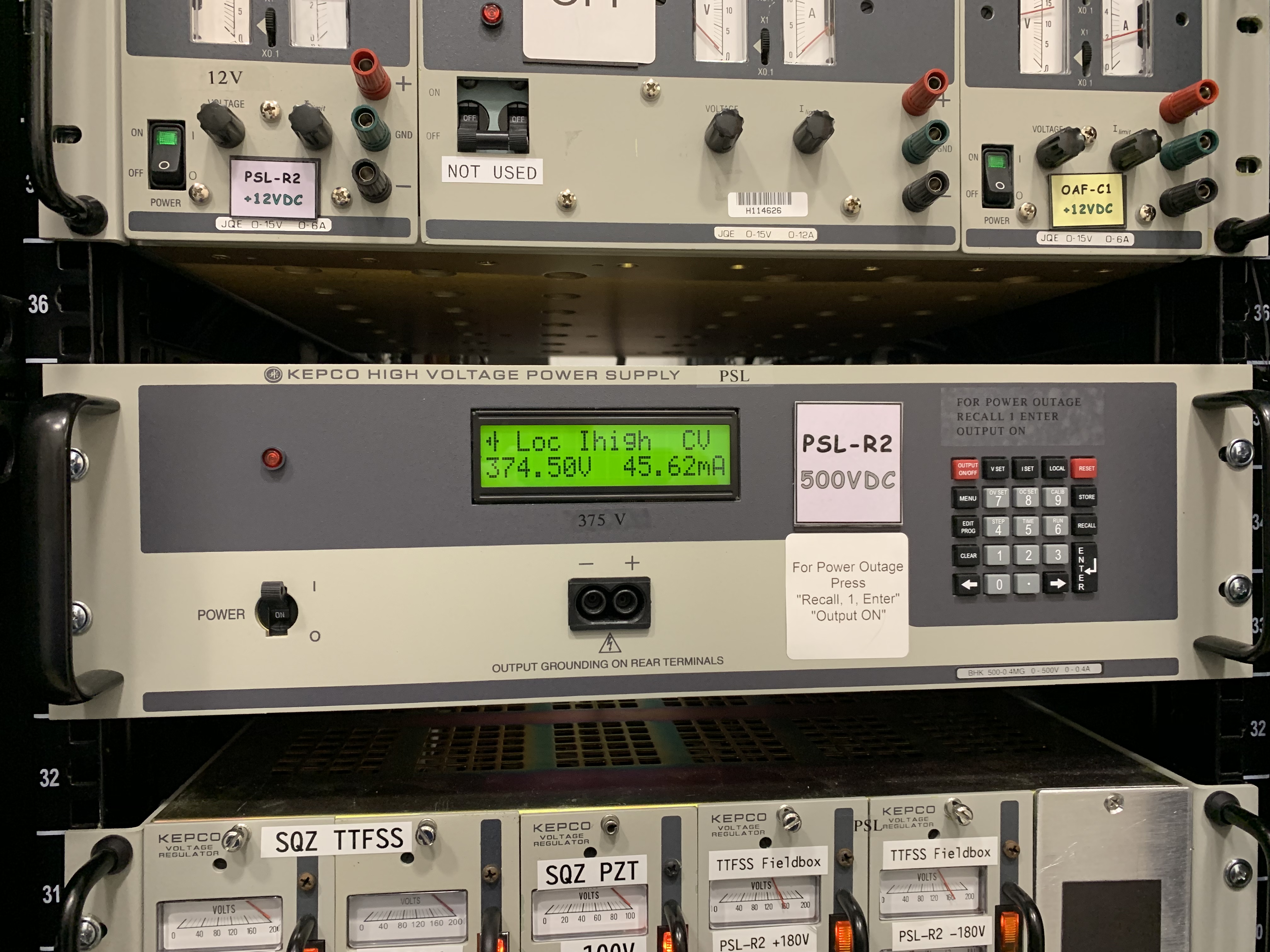
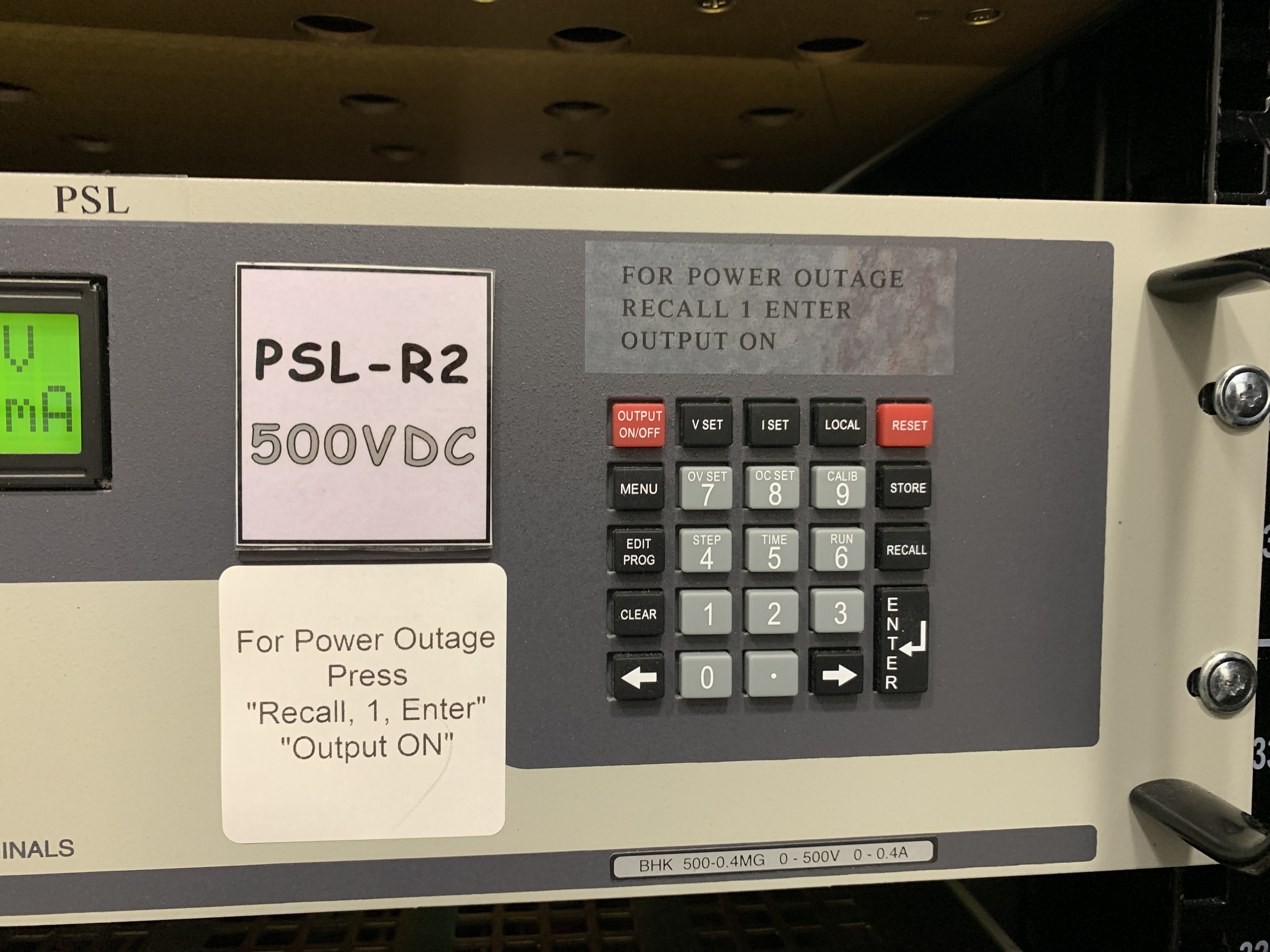
Just a s a point of interest, you should be able to program the HV power supply so that all it takes is the press of a couple buttons for anyone to reset it (even though here its usually Radar or I who still reset it). Here at LLO the PMC HV supply is the thing that usually goes out first with any power glitch and is the thing we reset the most/have to deal with with any power glitch.

Ive attached pics of the instructions we have on the front of our supply that once the values programed in show what we have to do to reset.

Images attached to this comment
H1 TCS (AOS, OpsInfo)
jeffrey.kissel@LIGO.ORG - posted 11:56, Wednesday 24 July 2019 - last comment - 11:56, Wednesday 24 July 2019(50777)
How to Restore Ring Heaters to Nominal Requested Heat Setting after Computer Failure when SDF is Poorly Maintained
C. Gray, J. Kissel, P. Thomas

I'm sure this is documented elsewhere, but in the heat (ha!) of recovery, it's always a challenge to remember where to look or whom to ask. So here's another bread crumb for future us (maybe LHO aLOG 47770 from Daniel "Danny" Vander-Hyde might have helped).

To restore ring heaters to their value in the event of a power outage:
(1) Trend the requested power and predictive kalman filter input for the past several days (assuming that the ring heaters have been in the desired state for the past several days. This two things should be the same. If they're not, then the actual requested power will be trending *very slowly* toward the kalman filter input. This is what we saw today. Note -- if we've recently increased the PSL input power, the nominal value may change for both, for example). 

Find the nominal value. 
      ndscope -k H1:TCS-ITMX_RH_SETUPPERPOWER H1:TCS-ITMX_RH_SETLOWERPOWER H1:TCS-ETMX_RH_SETUPPERPOWER H1:TCS-ETMX_RH_SETLOWERPOWER H1:TCS-ITMY_RH_SETUPPERPOWER H1:TCS-ITMY_RH_SETLOWERPOWER H1:TCS-ETMY_RH_SETUPPERPOWER H1:TCS-ETMY_RH_SETLOWERPOWER &

     As of 2019-07-24, the nominal values for a ~37 W IFO are 
              Upper [W]    Lower [W]
     ITMX     0.4907        0.4907
     ETMX     0.4500        0.4500
     ITMY     1.3930        1.3930
     ETMY     0.4024        0.4024

(2) Ring heater guardians are typically in "FILTER_RH_INPUT," which is taking "nominal" filter input, e.g. H1:TCS-ETMX_RH_INVERSE_FILTER_IN ,and if it's different from the actual requested powers, it'll slowly (predictively) push the actual request to the nominal via a predictive kalman filter (see LHO aLOG 46363). 

    Change which ever guardian is outside of its nominal, e.g. H1:GRD-TCS_ETMX_RH_PWR, from "FILTER_RH_INPUT" to "RESET."

(3) Change the actual requested power (e.g. H1:TCS-ETMX_RH_SETUPPERPOWER, H1:TCS-ETMX_RH_SETLOWERPOWER) to what it has been in the recent past.

(4) Change the guardian from "RESET" to "NOMINAL," this pushes the actual requested power (e.g. H1:TCS-ETMX_RH_SETUPPERPOWER) to the kalman filter input (e.g. H1:TCS-ETMX_RH_INVERSE_FILTER_IN).

(5) After confirming success (that the two channels in step (4) agree), then change the guardian back to "FILTER_RH_INPUT."
    EDIT: NOTE: See comment below -- we've decided to leave the guardians in NOMINAL, not FILTER_RH_INPUT. /EDIT

Today, we had ring heater settings restored by 2019-07-24 16:50 UTC (2019-07-24 09:50a PDT). 

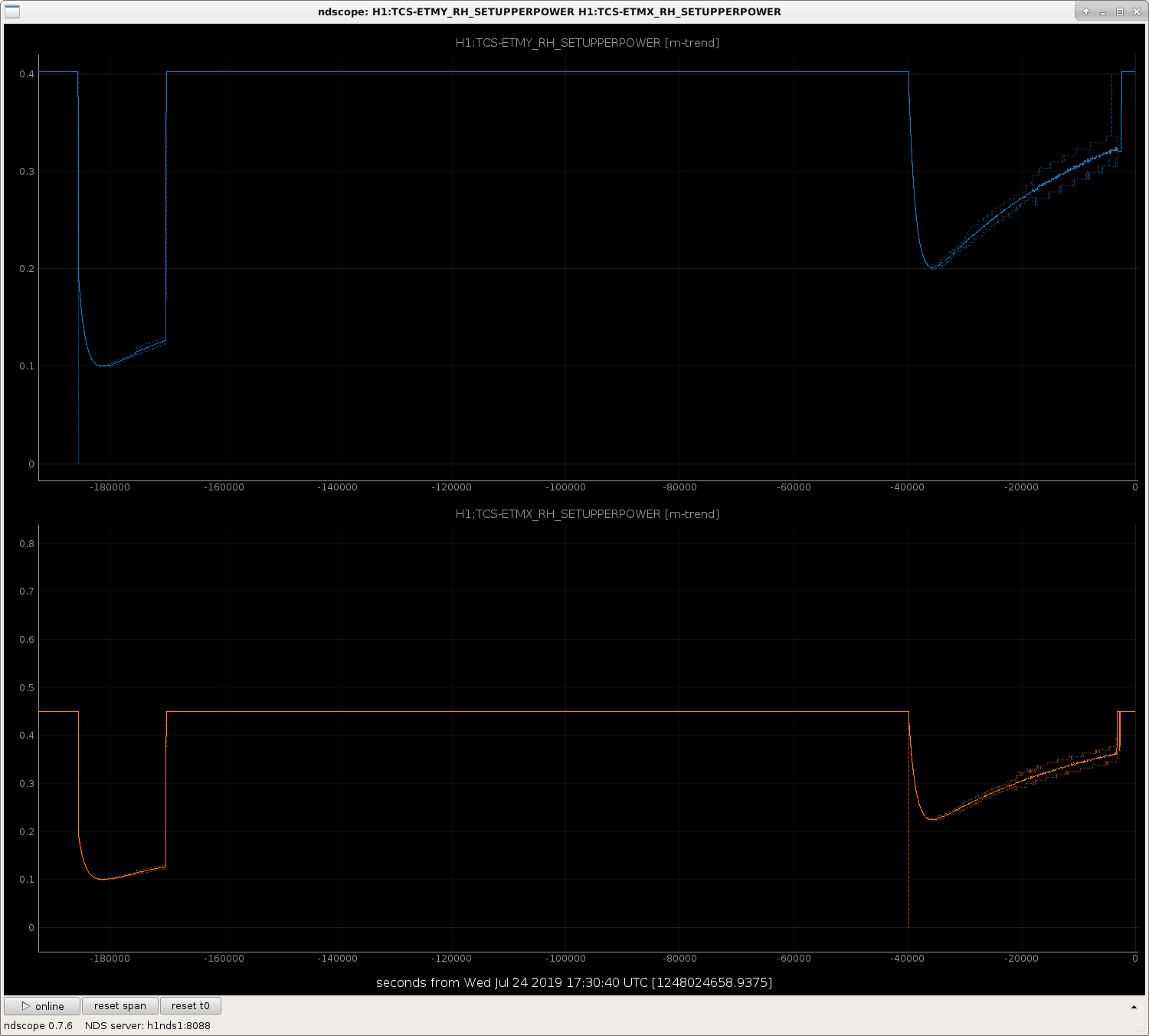
ETMX and ETMY(upper and lower) had been wrong since 2019-07-24 06:27 UTC (2019-07-23 11:27p PDT; so about 10 hours out). 

We will work on updating the SDF system so that the ETM values are restored to the above mentioned nominal values upon computer restart.

Comments related to this report
jeffrey.kissel@LIGO.ORG - 11:31, Wednesday 24 July 2019 (50781)AOS, ISC, OpsInfo
The requested powers are stored in three different Beckhoff PLCs' and one Front-end's SDF system, which is why they've been poorly maintained:

Ring Heater    Name on SDF         Name of SDF            Front-End "Computer"
               Overview            EPICs server           Name Hosting EPICs       System Type
ITMX & ITMY    CS_ECAT_PLC3        H1SYSECATCPLC3SDF      H1:FEC-1026_SDF          Beckhoff

ETMX           EX_ECAT_PLC3        H1SYSECATXPLC3SDF      H1:FEC-1029_SDF          Beckhoff 

ETMY           EY_ECAT_PLC3        H1SYSECATY1PLC3SDF     H1:FEC-1032_SDF          Beckhoff

Filter Input
All RHs        H1TCSCS             H1TCSCS_SDF            H1:FEC-26_SDF          "Fast" Front-end

We've now updated ALL of these SDFs' safe.snap to be set at the nominal values described above.

FURTHER: We haven't / hadn't trended back far enough, but -- in short -- these ring heater guardians should be in the NOMINAL state at all times, not FILTER_RH_INPUT.
Likely, when we powered up to 37 W in May, we intentionally changed the ring heater settings, and *left* the guardian states in "FILTER_RH_INPUT" -- because using the predictive filtering takes time -- and thus, in the rush to get to observing we accepted this state, and it's been this way for the recent past that we've trended on *some* (namely the ETMs) guardians.

However, we're no longer intentionally changing the ring heater settings (for the forseeable future, at least -- the next attempt power up is likely "weeks" away) so we don't need to engage the predictive filtering system. Thus, we should have all ring heater guardians in NOMINAL.

ALSO, ALSO: Back in May, during the power up, and in the rush to get back to observe, we un-monitored these requested power and filter input channels. Why? Because when we're *using* the predicitive filtering system, the predictive filter is slowly but actively changing the requested power. Again, because we're no longer using the predicitive filtering, and the requested power should be stationary, we have now REMONITORED the following channels:
    H1TCSCS
        H1:TCS-ITMX_RH_INVERSE_FILTER_IN
        H1:TCS-ETMX_RH_INVERSE_FILTER_IN
        H1:TCS-ITMY_RH_INVERSE_FILTER_IN
        H1:TCS-ETMY_RH_INVERSE_FILTER_IN

    CS_ECAT_PLC3
        H1:TCS-ITMY_RH_SETUPPERPOWER
        H1:TCS-ITMY_RH_SETLOWERPOWER
        H1:TCS-ITMX_RH_SETUPPERPOWER
        H1:TCS-ITMX_RH_SETLOWERPOWER

    EX_ECAT_PLC3
        H1:TCS-ETMX_RH_SETUPPERPOWER
        H1:TCS-ETMX_RH_SETLOWERPOWER

    EY_ECAT_PLC3
        H1:TCS-ETMY_RH_SETUPPERPOWER
        H1:TCS-ETMY_RH_SETLOWERPOWER

H1 TCS
corey.gray@LIGO.ORG - posted 10:49, Wednesday 24 July 2019 (50778)
Recovery Notes: TCS CO2 Laser & Ring Heaters

(CoreyG, JeffK, PatrickT)

[Jeff is currently writing an alog about recovering TCS Ring Heaters since neither of us knew how to restore them.]

Since TCS issues can cause long recovery times due to thermal effects, Jeff suggested looking at TCS this morning. 

TCS CO2 Laser

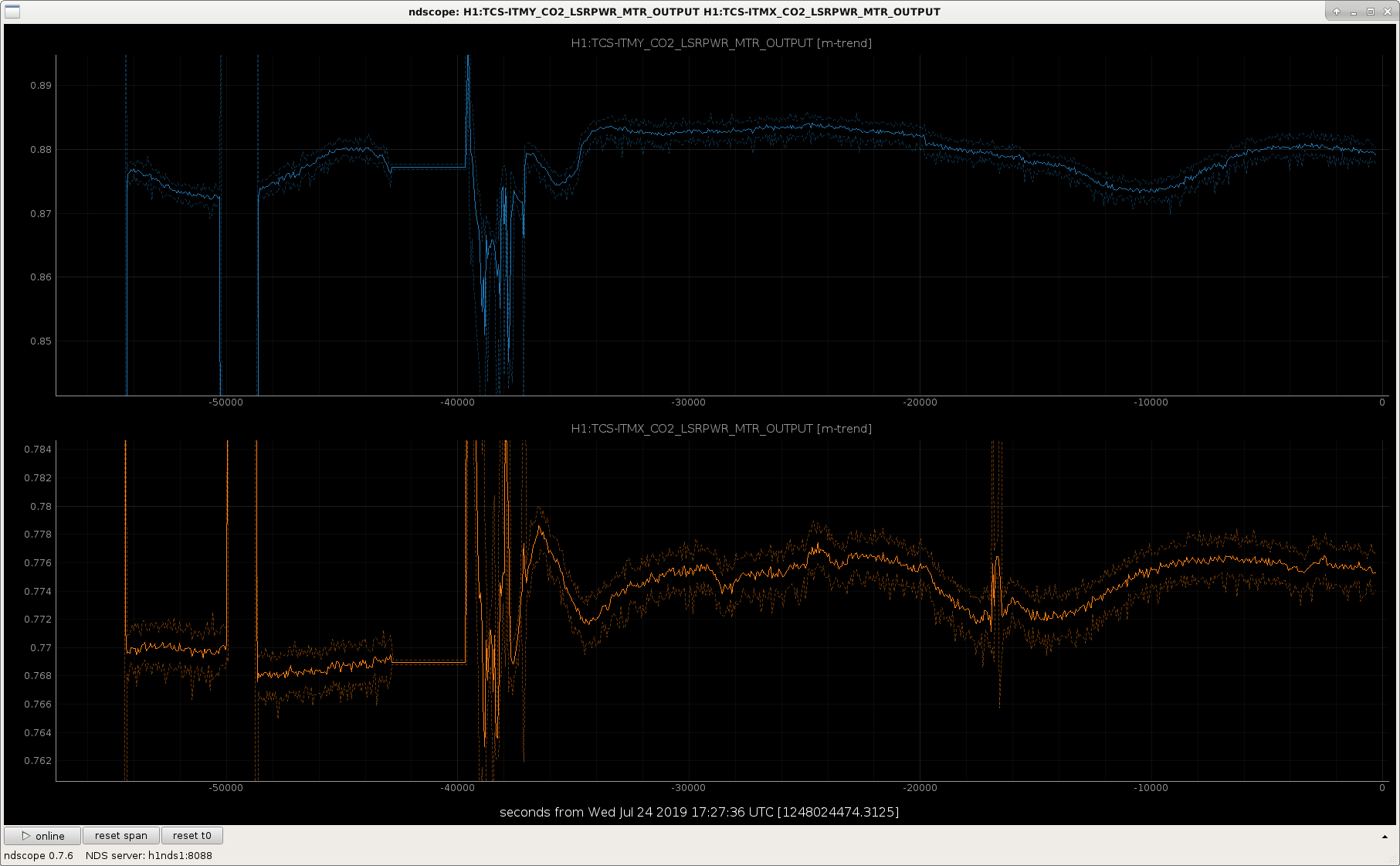
SInce I had recent experience with a dead CO2 laser, checked the Power MTR values for X & Y (attachement #1), and they look OK.

TCS ETMx/y Ring Heaters

When checking them (TCS_RING_HTR.adl for x & y), saw that the ETM x & y Requested Power for Upper & Lower were actively moving!  (these are normally non-changing values.  (Attachement #2 is a look at how these have looked with errant button pushing on Monday and the lightning storm issue last night).  Once again, see Jeff's alog for the Ring Heater recovery.

Images attached to this report
H1 SUS
corey.gray@LIGO.ORG - posted 10:24, Wednesday 24 July 2019 - last comment - 12:06, Wednesday 24 July 2019(50775)
Recovery Notes: Dither Align Scripts

(Jenne D, Corey G, Jeff K)

From Niko's handoff, we knew there was (1) communication issues with EY (so this would prevent locking EY), and (2) Both green arms looked clipped from their video. 

So one of the first things we thought we'd try is running a baffle alignment script....I later found that this is more correctly called a Dither Align script.  Jeff called Jenne to get info on how we can do this.

[Side Note:  TJ has plans to get baffle alignment into guardian.]

Ran Dither Align (i.e. Baffle Scripts)

  1. Misalign ITMx & ETMx (make sure TMSx aligned)
  2. Run TMSx Dither Align script  which is on drop down for Xarm on INIT_ALIGN window (when script done, it doesn't say anything like "done" or "complete", and terminal stays open.  But you'll see terminal no longer doing anything as well as no action on ndscope).  When it looks complete, move to ITMx...
  3. Align ITMx & run ITMx script....when it looks complete, move to ETMx
  4. Run ETMx script

Unfortunately, after completing the ETMx script, we did not see any light in the ALSx camera!

At this point, Jeff took ETMx to its slider values (not oplev, osem values, etc!) to an earlier time, and finally we had light on the camera, and X-arm eventually locked after some quick alignment tweaks!

Comments related to this report
jeffrey.kissel@LIGO.ORG - 12:06, Wednesday 24 July 2019 (50783)OpsInfo
Importantly -- the time to which one should restore slider values is *just before* a lock acquisition sequence, NOT when we're locked in nominal low noise.
In this case, I chose 2019-07-24 03:30 UTC (1247974218, Jul 23 2019 20:30:00 PDT).
LHO General
corey.gray@LIGO.ORG - posted 08:10, Wednesday 24 July 2019 (50769)
Transition to Day Summary

TITLE: 07/24 Day Shift: 15:00-23:00 UTC (08:00-16:00 PST), all times posted in UTC
STATE of H1: Corrective Maintenance
OUTGOING OPERATOR: Niko
CURRENT ENVIRONMENT:
    Wind: 2mph Gusts, 0mph 5min avg
    Primary useism: 0.02 μm/s
    Secondary useism: 0.05 μm/s 
QUICK SUMMARY:

H1 has been down for 11+ hrs due to power glitch from the thunderstorm last night (we are also in the CORRECTIVE_MAINTENANCE state for this).

What do we have:

H1 General
yannick.lecoeuche@LIGO.ORG - posted 08:10, Wednesday 24 July 2019 - last comment - 11:05, Wednesday 24 July 2019(50771)
Shift Summary - Owl

TITLE: 07/24 Owl Shift 07:00 – 15:00 (00:00-08:00), all times posted in UTC

STATE of H1: Corrective Maintenance

INCOMING OPERATOR: Corey

SHIFT SUMMARY: Power glitch has kept us out of commission for the shift. First PMC HV power supply had to be cycled, then FSS had to be manually locked. EY long range Dolphin is having issues, and different suspensions were saturating as soon as I tried to align them (Keita fixed this). Once the PSL was completely locked, IMC locked in a strange way and reported that IMC WFS were not centered.  Troubleshooting instructions for IMC did not help, waiting eventually fixed the problem (I think). Moved all the optics back to the positions they were in during the last lock, but ALSX and ALSY cameras still show beam clipping. This has been preventing me from trying initial alignment.

LOG:

07:00 (00:00) Start of shift

08:53 (01:53) Going to CER to check on PMC HV power supply

09:44 (02:44) Cycling the PMC HV power supply

14:08 (07:08) Peter, Richard to EX, EY -- reboot Dolphin networks

14:36 (07:36) Peter, Richard back from EX, EY

15:00 (07:00) End of shift

Comments related to this report
peter.king@LIGO.ORG - 11:05, Wednesday 24 July 2019 (50779)
Niko called this morning saying that the PSL was offline.  At that point in time, the laser was on but all the
servos were unlocked.  The following steps were taken:
 - restored the Kepco high voltage power supply (BHK 500-0.4MG) settings.  Output voltage 375V, current limit 50mA.  These values are
     on a label stuck to the front panel of the power supply
 - lock the pre-modeecleaner by enabling the lock button and ramp button
 - check the output DC values of PDA and PDB on the ISS MEDM screen.  Both should be ~10V.  Enable the autolock.  Check that the diffracted
     power is not gyrating wildly.  An indication of this is that the pre-modecleaner transmission fluctuates by many watts.
 - lock the FSS by enabling the autolocker.  Niko stated that it was taking some time for the FSS to acquire lock, so I told him
     how to lock the servo manually by entering manual mode and changing the laser crystal temperature, making note of the minimum and
     maximum temperature values listed in the lock acquisition range.  These limits are to minimise the beat note with the ALS laser.
     Once a mode was observed in the reference cavity transmission camera, press the loop on button to close the loop, then press the
     temploop button.  Enable the autolocker by pressing the ON button.

    The PSL was back online after completion of these steps.

    Next up was bringing the input modecleaner online.  The message about the WFS not being centred flashed up regularly.  Niko slowly
  brought the IMC mirrors back to their nominal positions.  Whilst this was happening the reflected beam improved.  After the restoration
  the IMC had no problems locking.                                                                                                                    
H1 CDS
david.barker@LIGO.ORG - posted 07:16, Wednesday 24 July 2019 - last comment - 08:08, Wednesday 24 July 2019(50768)
Rebooting h1cdsrfm with full power cycle of computer and end station adnaco chassis

Richard, Dave:

Richard is power cycling the adnaco chassis at both end stations. He reports possible problems with the X arm communications, MEDM only reported Y arm issues.

I disabled all three switch ports associated with the long-range dolphin before powering h1cdsrfm down.

Comments related to this report
david.barker@LIGO.ORG - 08:08, Wednesday 24 July 2019 (50770)

Still same situation, data goes to EY, but no data in the reverse direction.

Looking at dmesg on h1cdsrfm and comparing EX card and EY card, they are the same until the end. EX has:

[   56.381196] IXH Adapter 1 : NodeId is 100 - Serial no : 002344

[   56.382683] IXH Adapter 102 : Configured Adapter to nodeId=104 (GX nodeId=26)

[   56.487658] IXH Adapter 1 : Local adapter is connected to IXS600 switch, TOP, port 7

[   56.487708] IXH Adapter 1 : Link 0 is operational - Link width: x8 - PCIe Gen 2 -- Downtime: 0 sec

whereas EY has:

[   56.384263] IXH Adapter 2 : NodeId is 104 - Serial no : 002364

[   56.384937] IXH Adapter 2 : Set reachable remote node list.

Note that the cdsrfm system plugs into different IX-switch ports at the three locations (CS=5, EY=6, EX=7) so there is no ambiguity as to which is EX and EY.

DMESG Details:

EX:

[   51.202139] IXH Adapter 1 : Set min link width to x8

[   51.202140] IXH Adapter 1 : Set min link speed to Gen1

[   56.380546] IXH Adapter 1 : Driver attaching device 1

[   56.380639] IXH Adapter 1 : Local adapter type: IXH611

[   56.380641] IXH Adapter 1 : Number of local link ports enabled: 1

[   56.380699] IXH Adapter 1 : IDT Logan adapter chip revision: ZC

[   56.380749] IXH Adapter 1 : EEPROM version NTB mode: 8

[   56.380751] IXH Adapter 1 : Adapter serial number: IXH611-CE-002344

[   56.380798] IXH Adapter 1 : PCIe slot - x1, (gen2) 5 GT/s

[   56.380799] IXH Adapter 1 : BAR2 size: 256 MB

[   56.380801] IXH Adapter 1 : BAR4 size: 64 MB

[   56.380802] IXH Adapter 1 : BAR5 size: 8 MB

[   56.380804] IXH Adapter 1 : Prefetch memory BAR2 size: 256 MB

[   56.380852] IXH Adapter 1 : Logan chip temperature = 69 C

[   56.380994] IXH Adapter 1 : EEPROM dip-switch swmode[3:0]: 0010

[   56.380995] IXH Adapter 1 : Number of images in the EEPROM: 3

[   56.381043] IXH Adapter 1 : Clock mode slot (P0): Local

[   56.381044] IXH Adapter 1 : Clock mode link (P8): Local

[   56.381093] IXH Adapter 1 : GPIO data: 0x42

[   56.381094] IXH Adapter 1 : Multicast group size: 16 MB

[   56.381096] IXH Adapter 1 : Max payload size (MPS): 256 Bytes

[   56.381144] IXH Adapter 1 : Link[0] config: LINK_CONFIG_NTB

[   56.381192] IXH Adapter 1 : Adapter link 0 link width: x8

[   56.381194] IXH Adapter 1 : Cable link 0 PCIe link - x8, (gen2) 5 GT/s

[   56.381196] IXH Adapter 1 : NodeId is 100 - Serial no : 002344

[   56.382683] IXH Adapter 102 : Configured Adapter to nodeId=104 (GX nodeId=26)

[   56.487658] IXH Adapter 1 : Local adapter is connected to IXS600 switch, TOP, port 7

[   56.487708] IXH Adapter 1 : Link 0 is operational - Link width: x8 - PCIe Gen 2 -- Downtime: 0 sec

EY:

[   51.202144] IXH Adapter 2 : Set min link width to x8

[   51.202145] IXH Adapter 2 : Set min link speed to Gen1

[   56.383642] IXH Adapter 2 : Driver attaching device 2

[   56.383754] IXH Adapter 2 : Local adapter type: IXH611

[   56.383756] IXH Adapter 2 : Number of local link ports enabled: 1

[   56.383766] IXH Adapter 2 : IDT Logan adapter chip revision: ZC

[   56.383813] IXH Adapter 2 : EEPROM version NTB mode: 8

[   56.383815] IXH Adapter 2 : Adapter serial number: IXH611-CE-002364

[   56.383862] IXH Adapter 2 : PCIe slot - x1, (gen2) 5 GT/s

[   56.383864] IXH Adapter 2 : BAR2 size: 256 MB

[   56.383865] IXH Adapter 2 : BAR4 size: 64 MB

[   56.383867] IXH Adapter 2 : BAR5 size: 8 MB

[   56.383868] IXH Adapter 2 : Prefetch memory BAR2 size: 256 MB

[   56.383917] IXH Adapter 2 : Logan chip temperature = 69 C

[   56.384060] IXH Adapter 2 : EEPROM dip-switch swmode[3:0]: 0010

[   56.384061] IXH Adapter 2 : Number of images in the EEPROM: 3

[   56.384110] IXH Adapter 2 : Clock mode slot (P0): Local

[   56.384111] IXH Adapter 2 : Clock mode link (P8): Local

[   56.384160] IXH Adapter 2 : GPIO data: 0x42

[   56.384161] IXH Adapter 2 : Multicast group size: 16 MB

[   56.384163] IXH Adapter 2 : Max payload size (MPS): 256 Bytes

[   56.384211] IXH Adapter 2 : Link[0] config: LINK_CONFIG_NTB

[   56.384260] IXH Adapter 2 : Adapter link 0 link width: x8

[   56.384262] IXH Adapter 2 : Cable link 0 PCIe link - x8, (gen2) 5 GT/s

[   56.384263] IXH Adapter 2 : NodeId is 104 - Serial no : 002364

[   56.384937] IXH Adapter 2 : Set reachable remote node list.

H1 CDS
david.barker@LIGO.ORG - posted 01:12, Wednesday 24 July 2019 - last comment - 09:30, Wednesday 24 July 2019(50766)
h1cdsrfm reporting EY Dolphin link is not operational

Looking at the dmesg kernel messages on h1cdsrfm shows it sees an issue with IXH Adapter 2 (EY). It does not report it as operational. Since corner station to EY data is functional, presumably this is a partial failure of the IX611 card at EY. Looks like a power cycle of h1cdsrfm and the EY adnaco chassis is the next thing to try.

controls@h1cdsrfm ~ $ dmesg |grep "IXH Adapter 0"|grep oper

[   58.163158] IXH Adapter 0 : Link 0 is operational - Link width: x8 - PCIe Gen 2 -- Downtime: 0 sec

controls@h1cdsrfm ~ $ dmesg |grep "IXH Adapter 1"|grep oper

[   58.168059] IXH Adapter 1 : Link 0 is operational - Link width: x8 - PCIe Gen 2 -- Downtime: 0 sec

controls@h1cdsrfm ~ $ dmesg |grep "IXH Adapter 2"|grep oper

NO Response from last command

Comments related to this report
jeffrey.kissel@LIGO.ORG - 09:30, Wednesday 24 July 2019 (50774)
For the lay-person
    IXH Adapter 2 = dolphin network switch (maybe?)
    IX611 card = long range dolphin network card in side the h1cdsrfm computer.
    EY adnaco chassis = where the dolphin to long range fiber conversion happens
H1 General
yannick.lecoeuche@LIGO.ORG - posted 00:17, Wednesday 24 July 2019 - last comment - 02:51, Wednesday 24 July 2019(50764)
Ops OWL Shift Transition

Ops Shift Transition: 07/24/2019, Owl Shift 07:00 – 15:00 (00:00-08:00) - UTC (PT)

State of H1: Lock acquisition

Intent Bit: Commissioning

Weather: 0-30 mph wind

Primary 0.03 – 0.1Hz: 0.01 um/s

Secondary 0.1 – 0.3Hz: 0.1 um/s

Outgoing Operator: Travis

Quick Summary: Coordinating with Dave and Jason to try and recover the IFO. Still seeing a good deal of lightning on the cameras.

Comments related to this report
keita.kawabe@LIGO.ORG - 02:51, Wednesday 24 July 2019 (50767)

Received a call from Niko.

EY problem -> Wait for Dave till the morning.

Corner station problems need to be worked on now. Niko called Jason and Peter King to ask how to reset PMC HV supply.

In the mean time Niko told me that he couldn't move some of the optics state to ALIGNED. That was mostly becaue of DC centering loops and SQZ ASC were outputting huge numbers, so I just disabled ASC (didn't have to do that for SQZ ASC) and cleared the history.

MC2 length output was big because the MC board boost was on when not in lock. I disabled it to prevent MC2 from tripping. Hopefully the guardian will take care of the rest of the MC board setting once PSL comes back and when Niko runs the down script. If Niko cannot lock IMC he'll call me again.

H1 CDS
david.barker@LIGO.ORG - posted 22:56, Tuesday 23 July 2019 - last comment - 00:49, Wednesday 24 July 2019(50758)
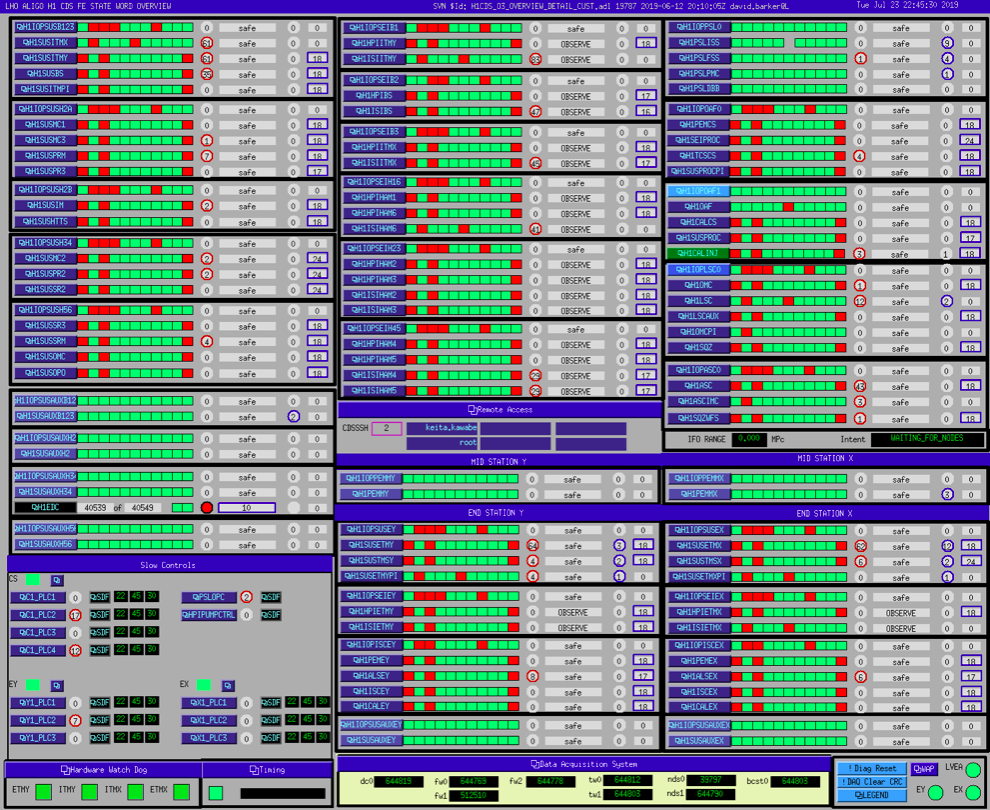
Electrical storm power glitch crashed all Dolphin'ed front end computers
Images attached to this report
Comments related to this report
david.barker@LIGO.ORG - 22:59, Tuesday 23 July 2019 (50759)

opened FRS13311

david.barker@LIGO.ORG - 23:05, Tuesday 23 July 2019 (50760)

All front end can see their respective IO Chassis, I'm starting the model recovery.

david.barker@LIGO.ORG - 23:48, Tuesday 23 July 2019 (50762)

All models restarted. Jonathan reports DAQ is in good health.

Long range dolphin is down, I'm investigating.

david.barker@LIGO.ORG - 00:07, Wednesday 24 July 2019 (50763)

h1cdsrfm computer had restarted itself (it is a diskless front end, but the only one which got rebooted). I had to remember how to start the code since we haven't done so since Nov 2018.

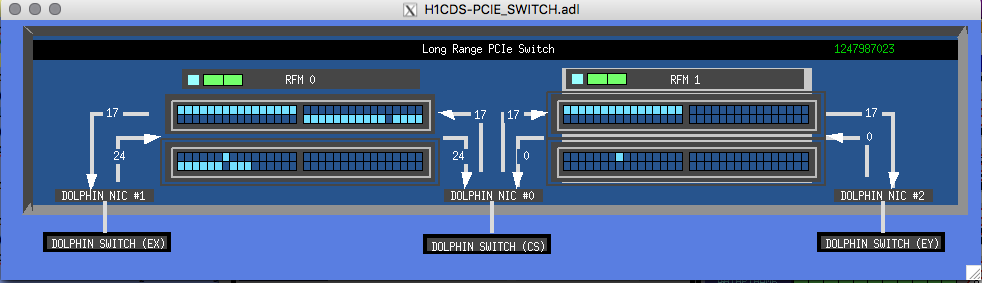
Code is running, bad news is that we are not receiving anything from EY. This could be a possible problem with the EY remote Adnaco chassis. No, I can see all three Dolphin IX cards.

Images attached to this comment
david.barker@LIGO.ORG - 00:49, Wednesday 24 July 2019 (50765)

I've tried several reboots of h1cdsrfm, but I still get the problem that IPC from EY to the corner station is failing (CS to EY is working). 

H1 TCS
jason.oberling@LIGO.ORG - posted 15:28, Tuesday 23 July 2019 - last comment - 15:06, Thursday 25 July 2019(50741)
TCSy Trip @ 11:41am, Cause Unknown

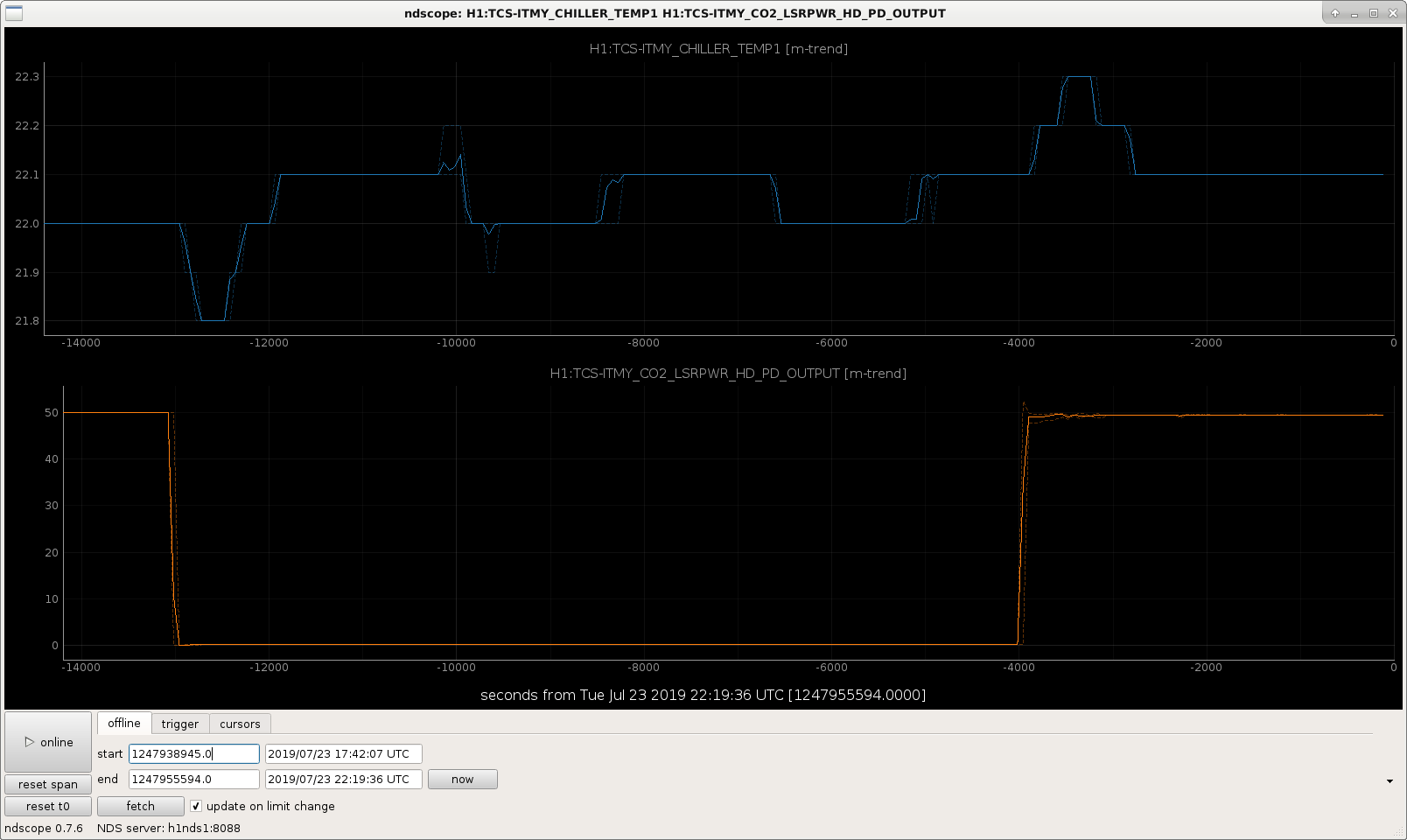
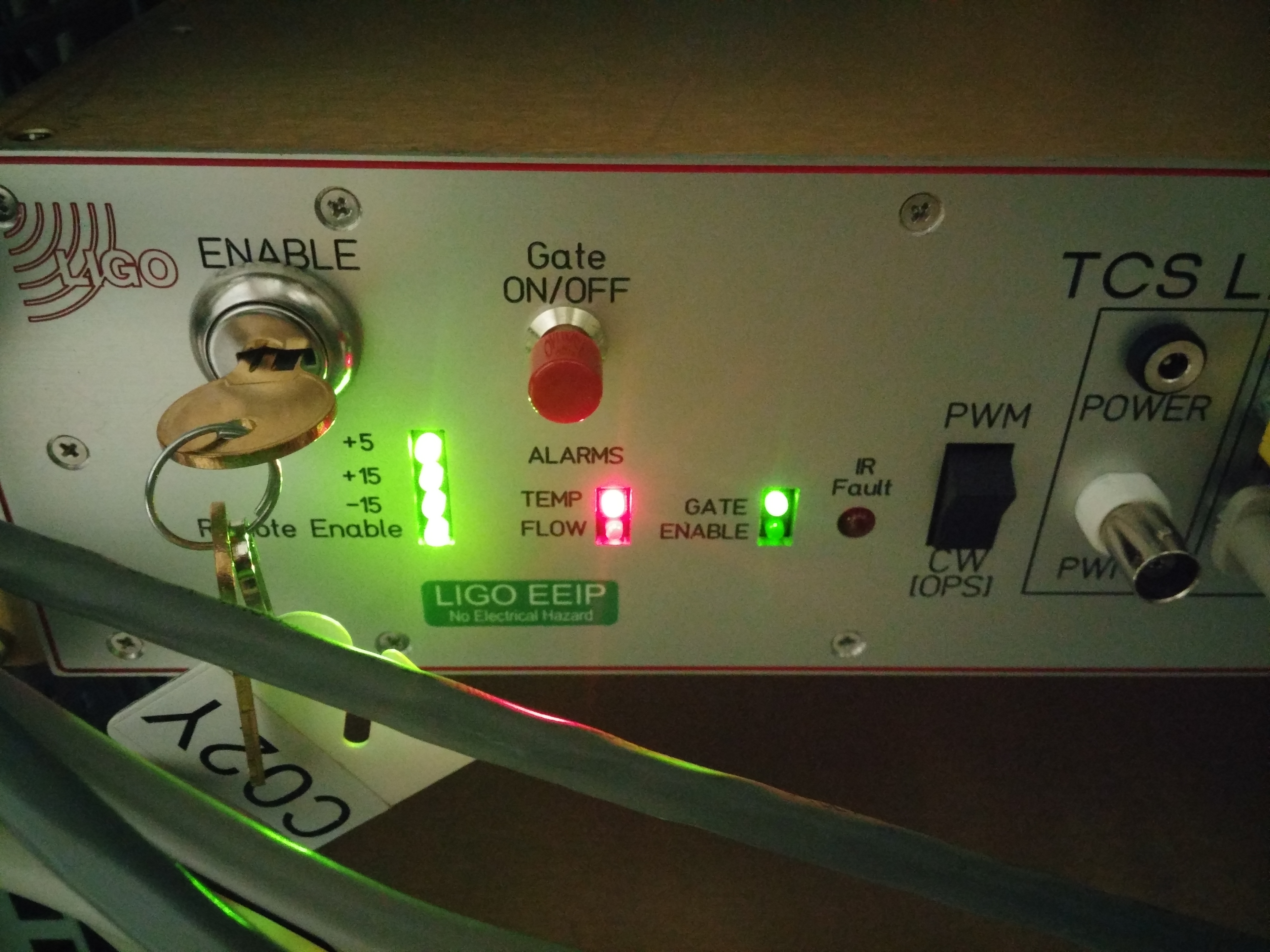
Corey called shortly after 14:00 PDT and informed me that the TCSy laser was off.  Looking at the MEDM screen, the RTD/IR SENS. ALARM was red and the laser was off.  I went to the LVEA and reset the laser at the front panel; I also took a picture of the front panel before I reset it, I'll attach it as a comment (it's on my phone at the moment).  This cleared the temp alarm and the laser restarted without issue.

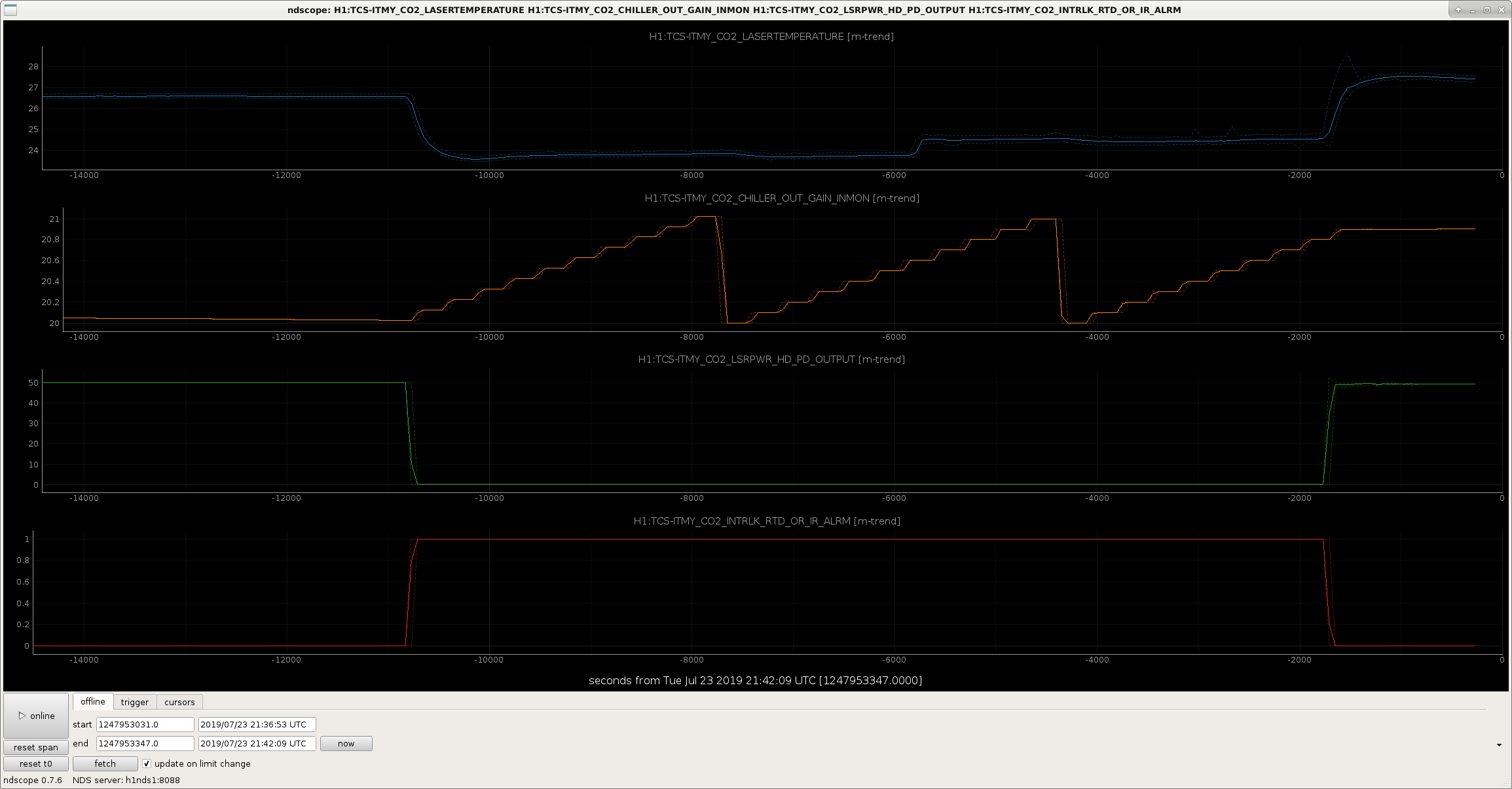
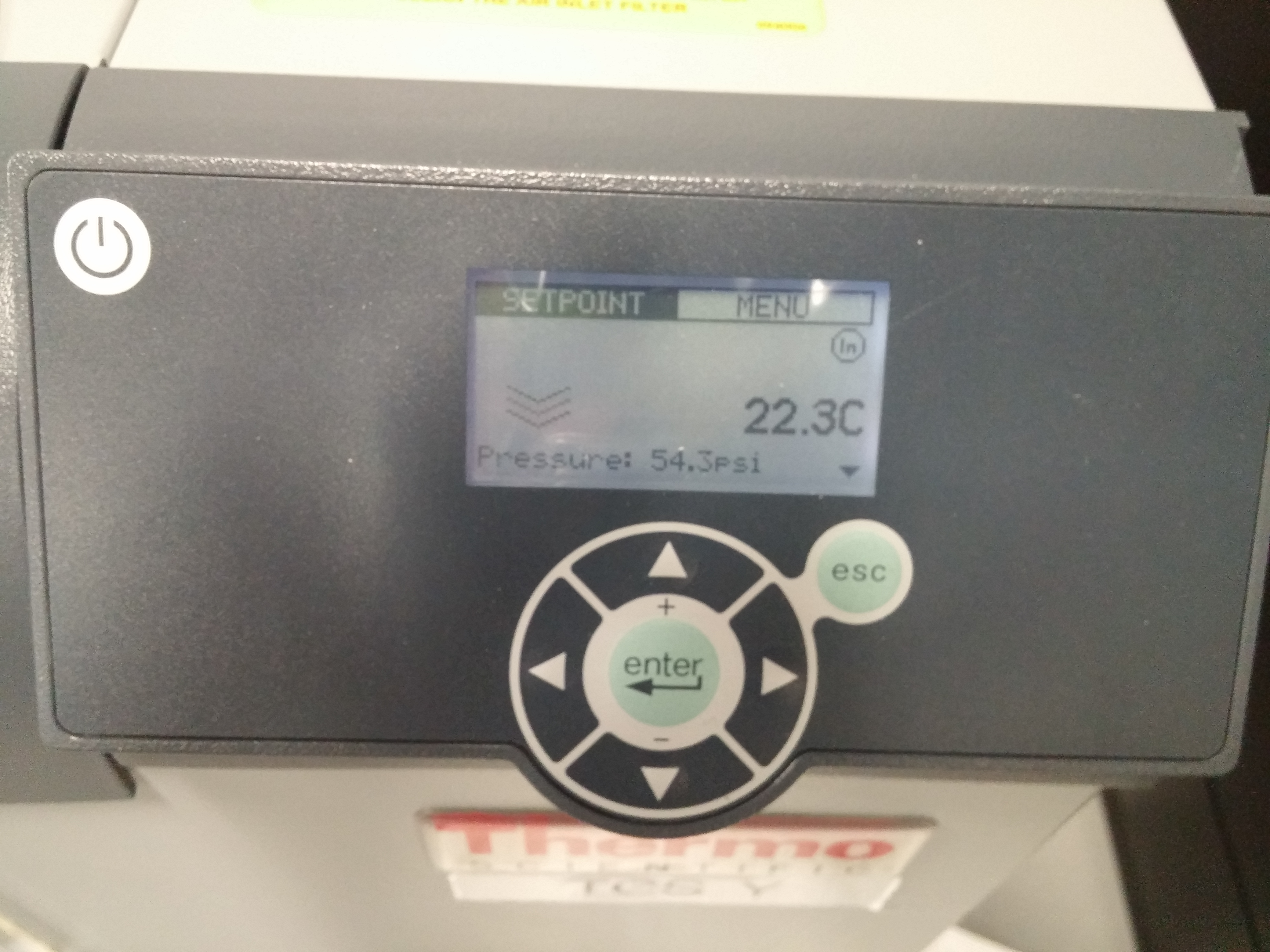
Trending back with ndscope (see 1st attachment), the laser tripped off around 11:41am PDT.  The laser temperature was holding steady at the time of the trip, so the laser did not overheat.  While the laser was off, the chiller setpoint was stepping from 20 °C to 21 °C in 0.1 °C steps; it went through this a couple times, as seen in the attachment.  Seeing this, I went out and checked on the chiller and found it was reporting a water temperature of 22.3 °C; the setpoint for the laser after restarting was 20.9 °C.  The 2nd attachment shows the water temp reported by the chiller starting .  At the time of the trip the chiller was reporting a water temp of 22.0 °C, and is currently reporting 22.1 °C (There appears to be a descrepancy between the chiller setpoint and the water temp reported by the chiller, which I have never noticed before.  I.E. before the trip the setpoint was just over 20 °C, while the chiller was reporting a water temp of 22.0 °C.  Is this normal?  Or could this be part of the cause of the trip?).  At this point it is unclear what caused the laser to trip.  Investigation continues.

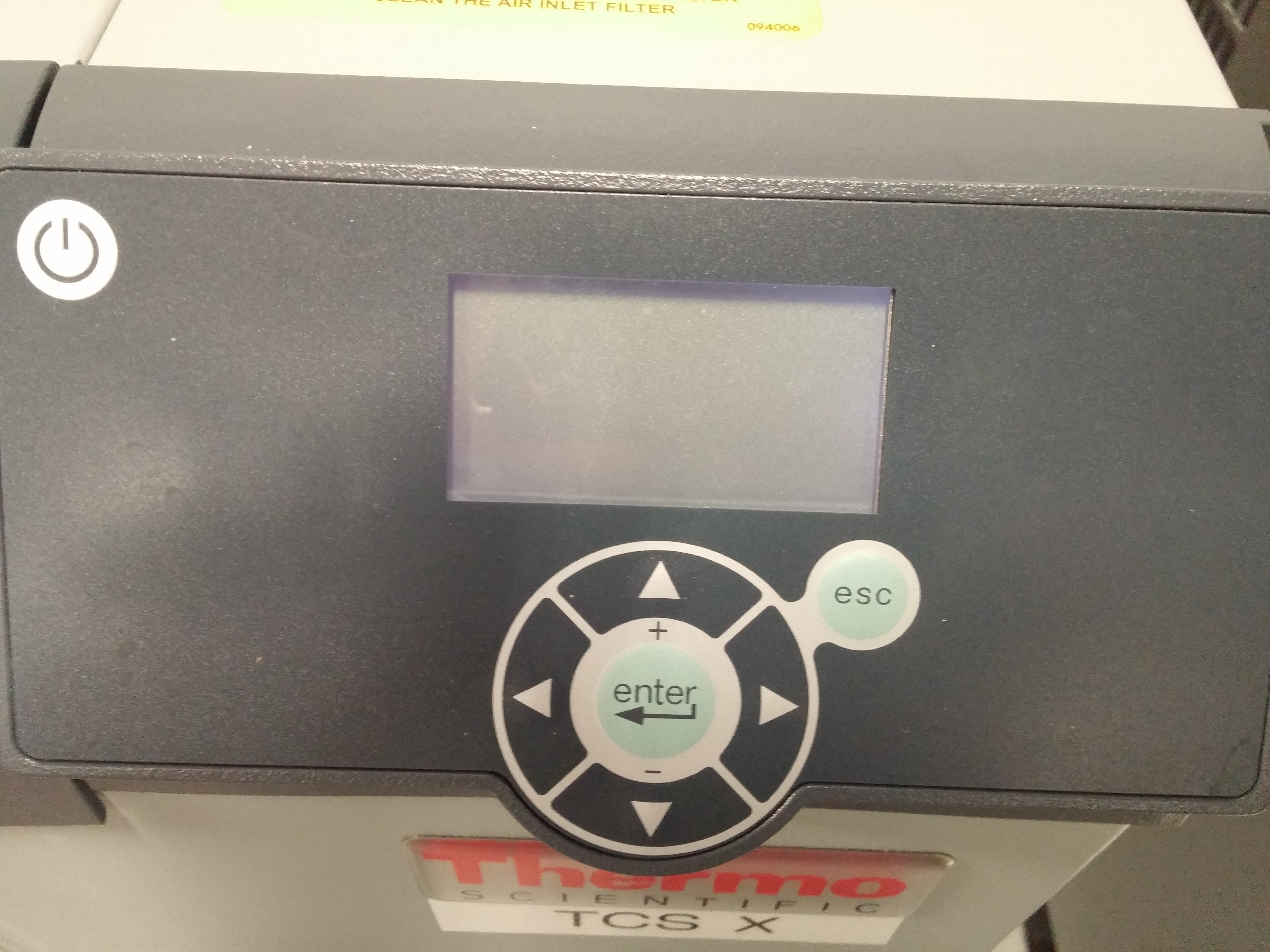
I should also note, while I was looking at the TCSy chiller, I ran into Jeff B.  He pointed out something interesting, the small display screen on the TCSx chiller has gone blank.  The chiller is still running and the TCSx laser appears to be working fine, so it appears the display has simply quit working (I've never seen them blank before (like one would expect when a display goes to sleep), everytime I go to check on the chillers they displays are active).

Edited at 15:35 PDT as I hit the POST button a little too early.

Images attached to this report
Comments related to this report
jason.oberling@LIGO.ORG - 15:45, Tuesday 23 July 2019 (50742)

A couple pictures.  The first is the front panel for the TCSy CO2 laser.  Notice that the IR Fault light is not lit, but the Temp alarm is.  I seem to remember that when the viewport IR sensor trips, the IR Fault light flashes but does not hold, but I don't think the Temp alarm accompanies this.  So I think this rules out the viewport IR sensor.

The 2nd attachment is the blank display on the TCSx chiller, while the 3rd is the active display on the TCSy chiller.

Entered FRS 13309 for this trip.

Images attached to this comment
thomas.shaffer@LIGO.ORG - 12:15, Wednesday 24 July 2019 (50784)

The chiller screen has been blank since January when Patrick reenabled the serial communication (alog46289).

The discrepencies in the tempuratures is interesting. I think this may be a good lead because these TCSY lock losses have become more frequent when we put the spare chiller in.

jason.oberling@LIGO.ORG - 13:57, Wednesday 24 July 2019 (50789)

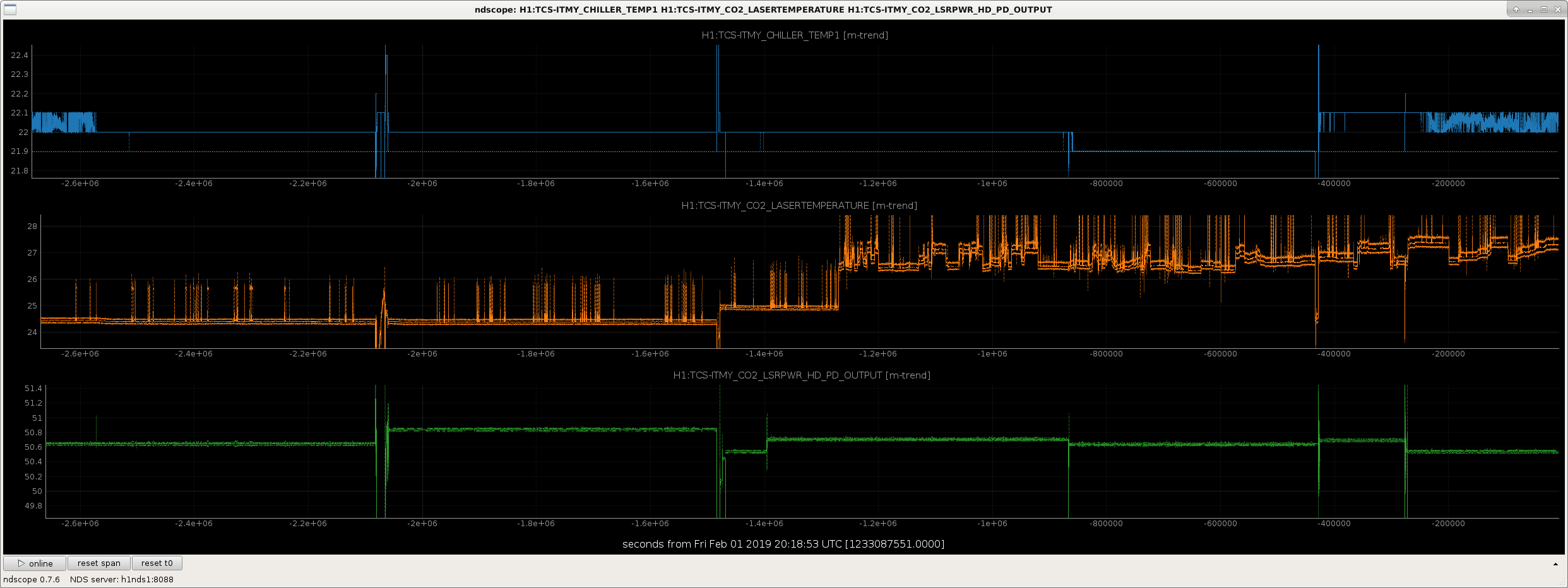
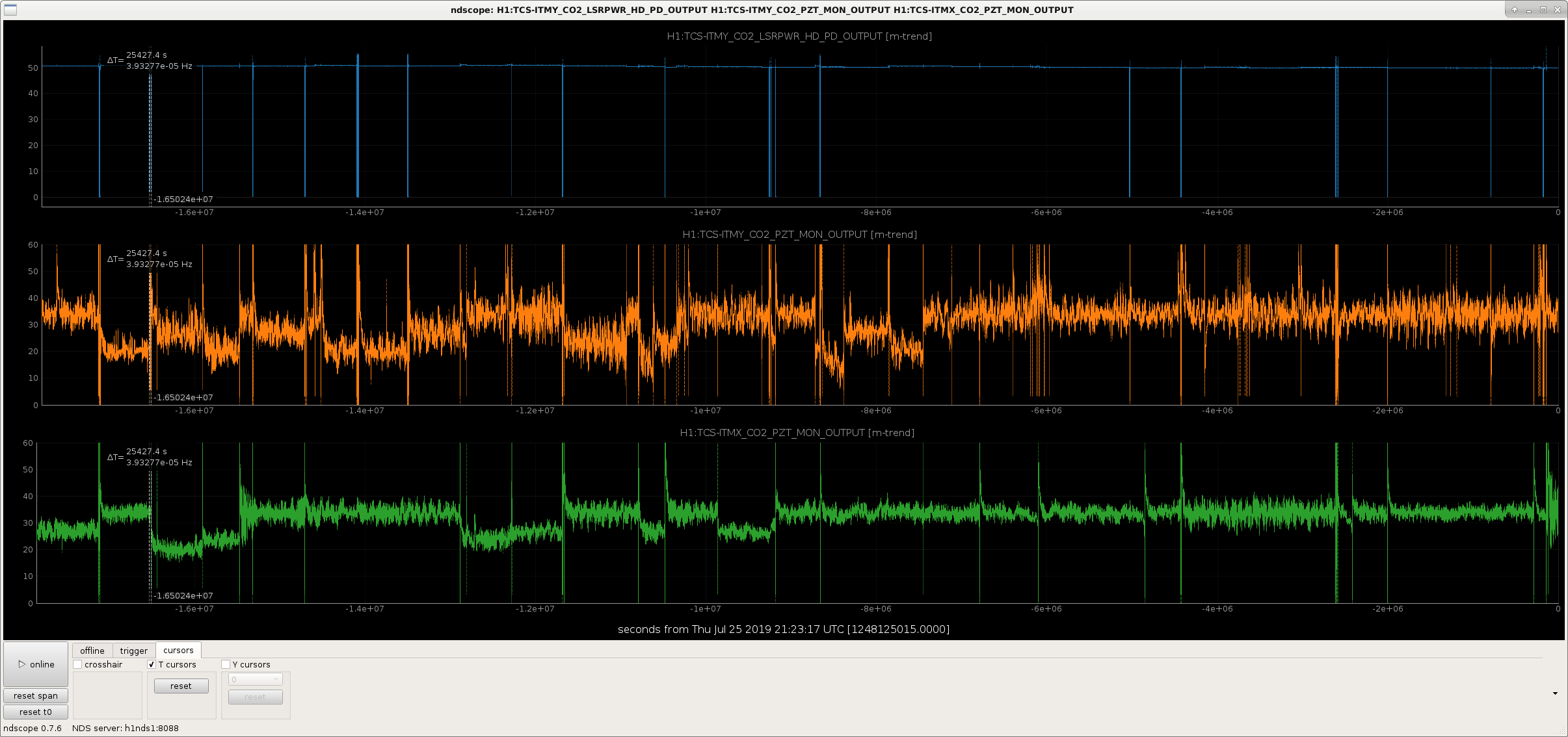
I think TJ might be on to something here.  I trended the power and temp of the TCSy CO2 laser, and the temp reported by the TCSy chiller, through the month of January 2019, bookending the chiller swap that occured on Jan 15 2019.  After the swap the laser temp increased from ~24.5°C to ~25 °C.  It hovered there for about 3 days or so, then jumped up to ~ mid-26 °C, with jumps up to over 27 °C.  In addition to this, the laser temperature became much more erratic after the swap, and that behavior has continued to today.  It should be noted that the TCSx CO2 laser sits at a laser temperature of ~24.3°C, around where the TCSy CO2 laser temp used to sit before the chiller swap.  Next step is to look back into 2018 to see if the stable pre-chiller-swap TCSy laser temperature behavior is consistent or a fluke.  Another interesting thing to check is if the TCSy CO2 PZT is moving more than the TCSx CO2 PZT.  I seem to recall seeing an alog about this, I'll hunt it down and link it here if it's relevant.

Images attached to this comment
jason.oberling@LIGO.ORG - 15:06, Thursday 25 July 2019 (50828)

More data mining.

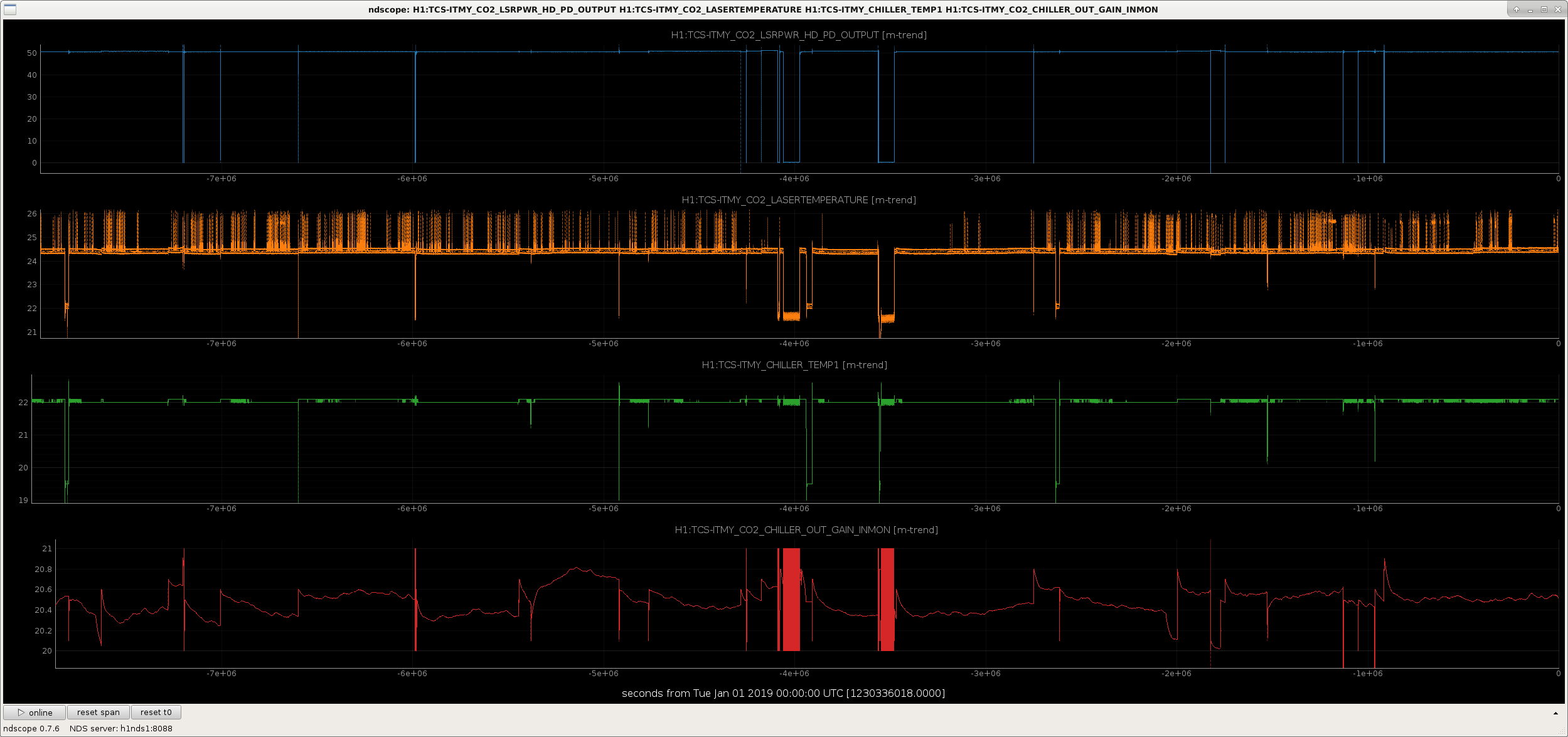
1st attachment is the laser power and temperature, as well as the chiller setpoint and the temp reported by the chiller itself, for the 4th quarter of calendar year 2018 (Oct-Dec 2018).  As can be seen, even though there are spikes, the temp is consistently in the low-24s °C, not bouncing around as seen after the chiller swap (in the plot I posted in the 3rd comment above).  Also of note, the discrepency between the temp reported by the chiller and the chiller setpoint is present even on the original TCSy chiller.  That said, this is further evidence that the spare TCS chiller doesn't seem able to hold the laser at a consistent operating temperature.

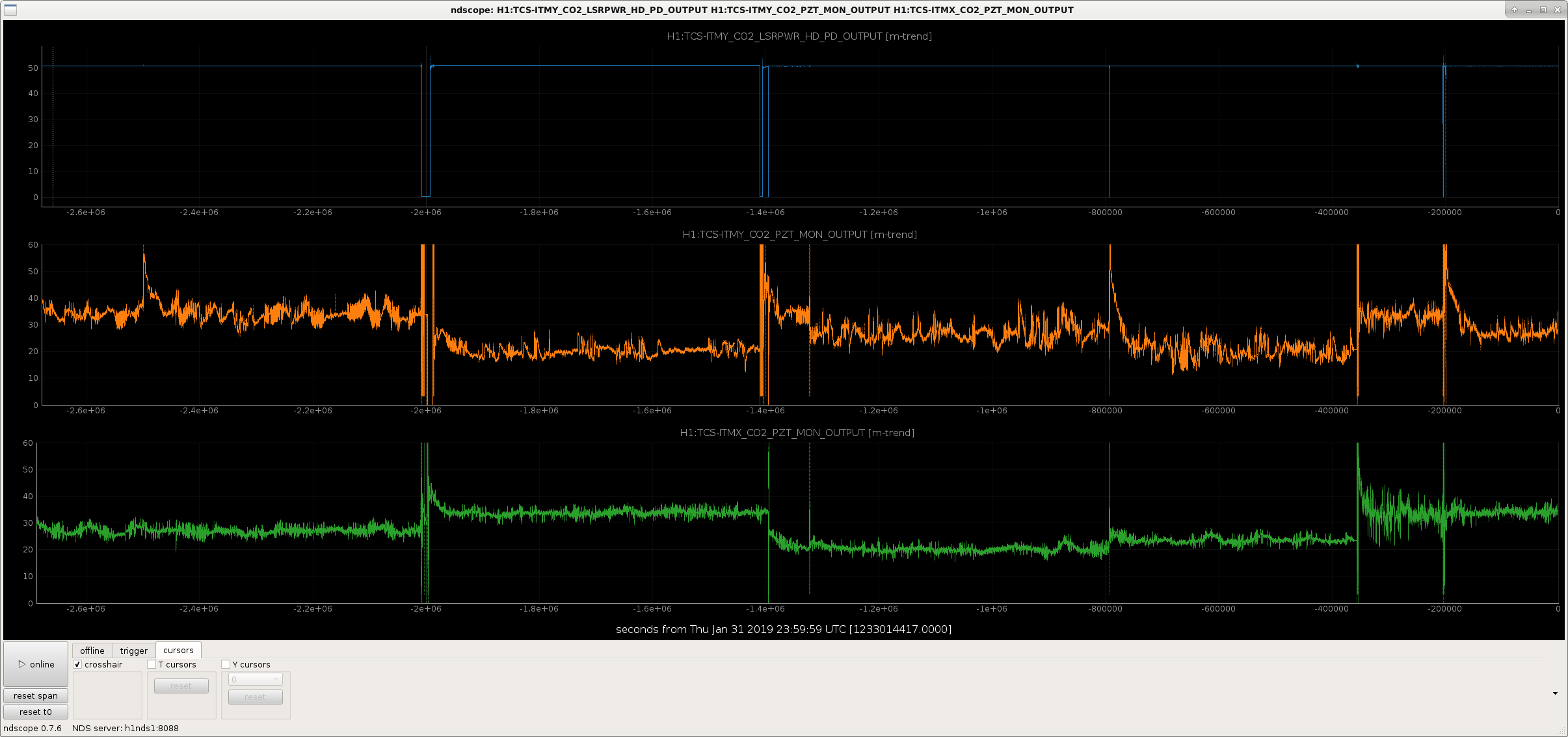
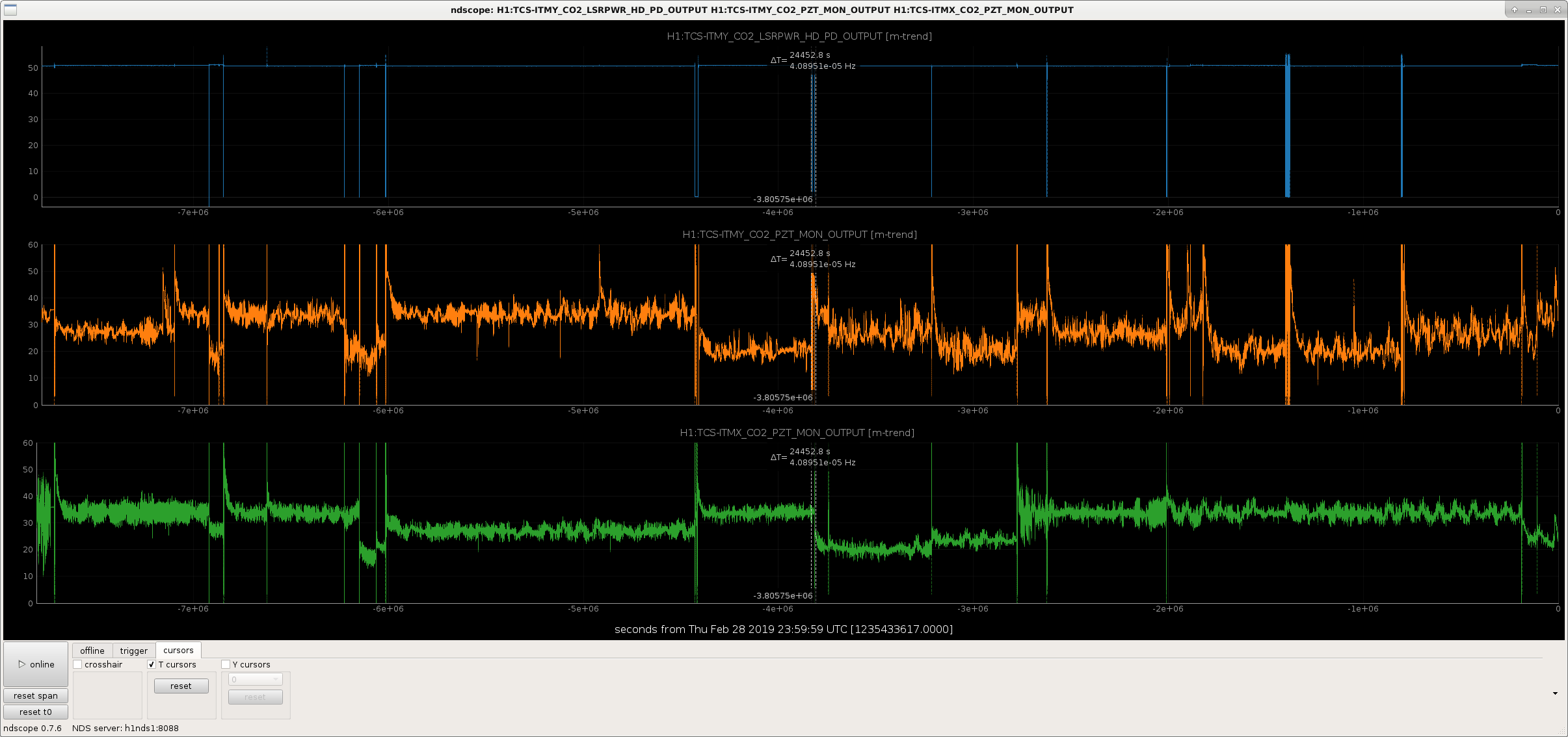
Also, I found the alog regarding PZT movement between the 2 TCS CO2 lasers; TJ noted this on July 10th in this alog.  Taking this a step further, I plotted out the PZT signal for each CO2 laser for the month of January 2019 (as I did with the laser temp yesterday), as well as from Dec 2018 to Feb 2019 (inclusive; the cursors indicate the TCSy chiller swap).  The CO2y laser PZT (PZTy from here on, easier to type) does move more than the CO2x laser PZT (PZTx), but the difference in PZTy movement pre- and post-chiller swap is less pronounced but noticable.  This also holds when looking at the longer 3 month trend (interesting note: at times, PZTx moves more than PZTy, but it's rare).  I then looked at the PZT movement from Jan 1 2019 to now (final attachment, chiller swap again indicated by the cursors).  PZTy in general is more active that PZTx and has been for some time.  There are also stretches after the chiller swap where PZTy is moving more than its new norm, but this does not appear to be getting worse as time goes on.

Images attached to this comment
H1 TCS (TCS)
corey.gray@LIGO.ORG - posted 10:35, Monday 22 July 2019 - last comment - 12:22, Wednesday 24 July 2019(50702)
TCSy Chiller Has/Had Big Air Bubble Due To Filter (also TCS chillers FAMIS task (#11501))

TCSy Chiller:  Air Bubble at intake & 500mL added!

It was hard to read the TCSy Chiller level value this morning because it was oscillating noticeably between atleast 8.0 & 8.6cm!  (it is usually holds a steady value.) 

Removed the gray cover and I believe the level went "up" to a normal level near 10.0cm!  So this had me look at TCSx chiller for comparison.  TCSy chiller looks like it had a big air bubble with the white fabric mesh filter balloon-ing up (maybe this was pulled up by suction when I removed/pulled-up on the gray cover?); hard to tell, but attaching a photo of the big air bubble.  This air bubble moved around a bit and this is probably the reason for the oscillating reading for the level noted above.

At any rate, I tried to adjusting the filter and the ring frame which holds the filter to reseat it such that the bubble would subside.  After a few adjustments, the level did drop down to 8.0cm or below.  At this time I started to fill the chiller.  I probably added on the order of ~500mL, but this was after a few iterations of adjusting the filter and adding water.  I was not able to completely remove the air bubble.

We will want to keep an eye on this chiller, it had been exhibiting odd behavoir as of late [level increasing(7/1, 7/7) and possible leak which "fixed" itself" (5/21)].  Will send an email to Jason/Betsy/TJ regarding this.

TCSx Chiller:  Had level of 29.8 cm.  Filled to 30.0 with 125 mL of water.  This is normal for it.

Images attached to this report
Comments related to this report
jason.oberling@LIGO.ORG - 11:41, Monday 22 July 2019 (50705)

Went out and checked on this and found there was still a small air bubble in the chiller reservoir underneath the mesh filter (as opposed to the wire filter that preceeds the mesh filter).  I unsealed the mesh filter (the mesh filters create a seal around the reservoir opening when properly installed), which allowed the air bubble to clear, and reseated it.  The water level dropped from 10.1 to 9.2 (this is normal when clearing an reservoir air bubble, as it causes faulty readings in the chiller level.  This is a design "feature" of the chiller, and the reason why we unseal the mesh filter when topping off the reservoir (adding water with the filter still sealed is the most common cause of reservoir air bubbles)); I did not add water as even with this level change the chiller is still mostly full.  I will monitor this over the coming days to see if there are any changes in water level and/or formation of a new air bubble.

Also, the fix for the water leak Corey mentions in his alog is described here.

thomas.shaffer@LIGO.ORG - 12:22, Wednesday 24 July 2019 (50785)

One of the reasons we have been keeping the the filters not completely seated is because they can create false readings, perhaps from too good of a seal. I've reccomended that the filters be cocked at a slight angle to keep this from happening, with the risk that it might not filter 100% of the water.

Displaying reports 39681-39700 of 88963.Go to page Start 1981 1982 1983 1984 1985 1986 1987 1988 1989 End