ETMX:
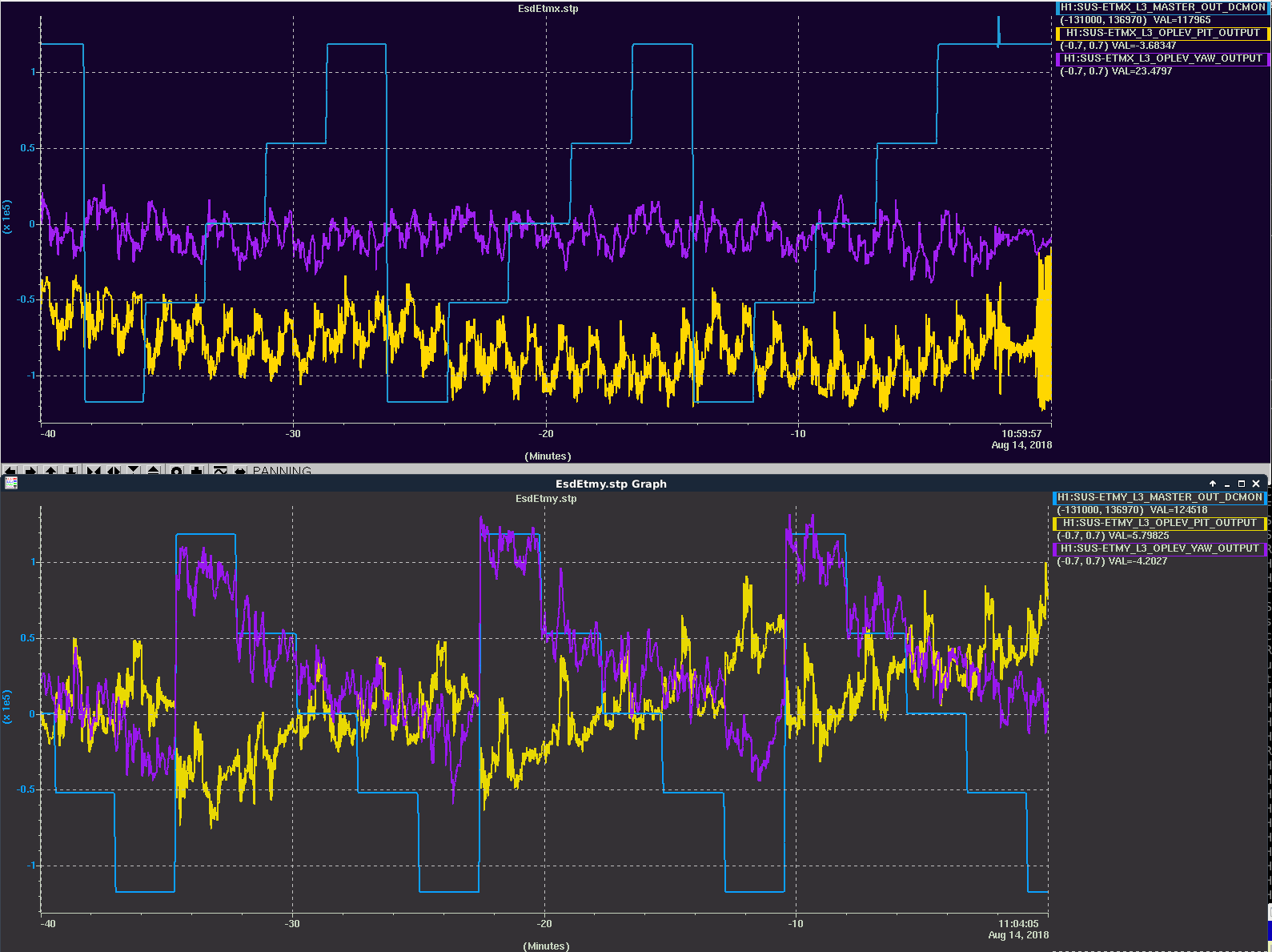
System continues to be protected by the Hardware Watchdog. h1susex models are not functioning, DAC outputs for SUS-ETMX and SUS-TMSX presumably frozen at last value. Because the IPC to h1seiex is frozen, the Software Watchdog on h1seiex has tripped and all DAC drives are zero for ISI-ETMX and HPI-ETMX.
Possible Sunday recovery is to reset h1susex, which may dolphin glitch h1seiex and h1iscex. This is not an issue since h1seiex has SWWD tripped and is therefore not driving.
ITMX:
System continues to be protected by the Hardware Watchdog. h1seib2 models are not functioning, DAC outputs for ISI-ITMX and HPI-ITMX presumably frozen at last value.
Possible Sunday recovery: there are no IPC errors in the corner station resulting from the loss of h1seib2. One minimal-impact recovery would be to power off h1seib3 and remove its Dolphin cable before powering it back on with a modified h1iopseib3 model which temporarily disables the SWWD. This would restore SEI-ITMX function and not precipitate a restart of most of the corner station models.
Monday Recovery: reset frozen systems, restart any subsequently glitched models, rebooting all computers with uptime exceeding 208.5 days. A slower recovery will be to upgrade RCG to 3.4.2 (restart all models).
After making it through the week with no critical systems freezing up, two systems froze overnight: h1seib3 (ITMX) and h1susex.
If these systems are needed today please call me and we can coordinate a reset. Otherwise we will reset most machines tomorrow.
I'll be mostly at Y-mid tinkering with the GN2 flow through CP4. Chandra R. is my "phone buddy" and I'll make a comment to this entry when I leave.
As found, GN2 flow through CP4's regeneration circuit was steady and indicated on the first scale graduation (12 SCFH x 100). The dewar head pressure(s) were 10 psi and 12 psi as per the mechanical gauges -> I opened the Pressure Build valve 1 turn ccw and the dewar head pressure increased by 2 psi over 20 minutes. Correspondingly, the GN2 regeneration flow increased to a varying 40 - 50 SCFH x 100. I did not notice any reverse flow through the Fill Connection line. The Regeneration Temperature decreased, as expected, with the increase in flow. Even so, I don't feel comfortable leaving the site with the Pressure Build valve open as we have no way to remotely monitor the exhaust line pressure and I can't be sure that the dewar head pressure has stabilized. As a compromise, I closed the Pressure Build valve and, instead, adjusted the dewar head pressure (a.k.a. vapor pressure) regulator (a.k.a. "economizer") 1/4 turn cw. This should slowly increase the dewar head pressure a little over the next day or so and the regeneration flow should also increase a little as a result.
1040 hrs. local - > Leaving site now via one last check at Y-mid
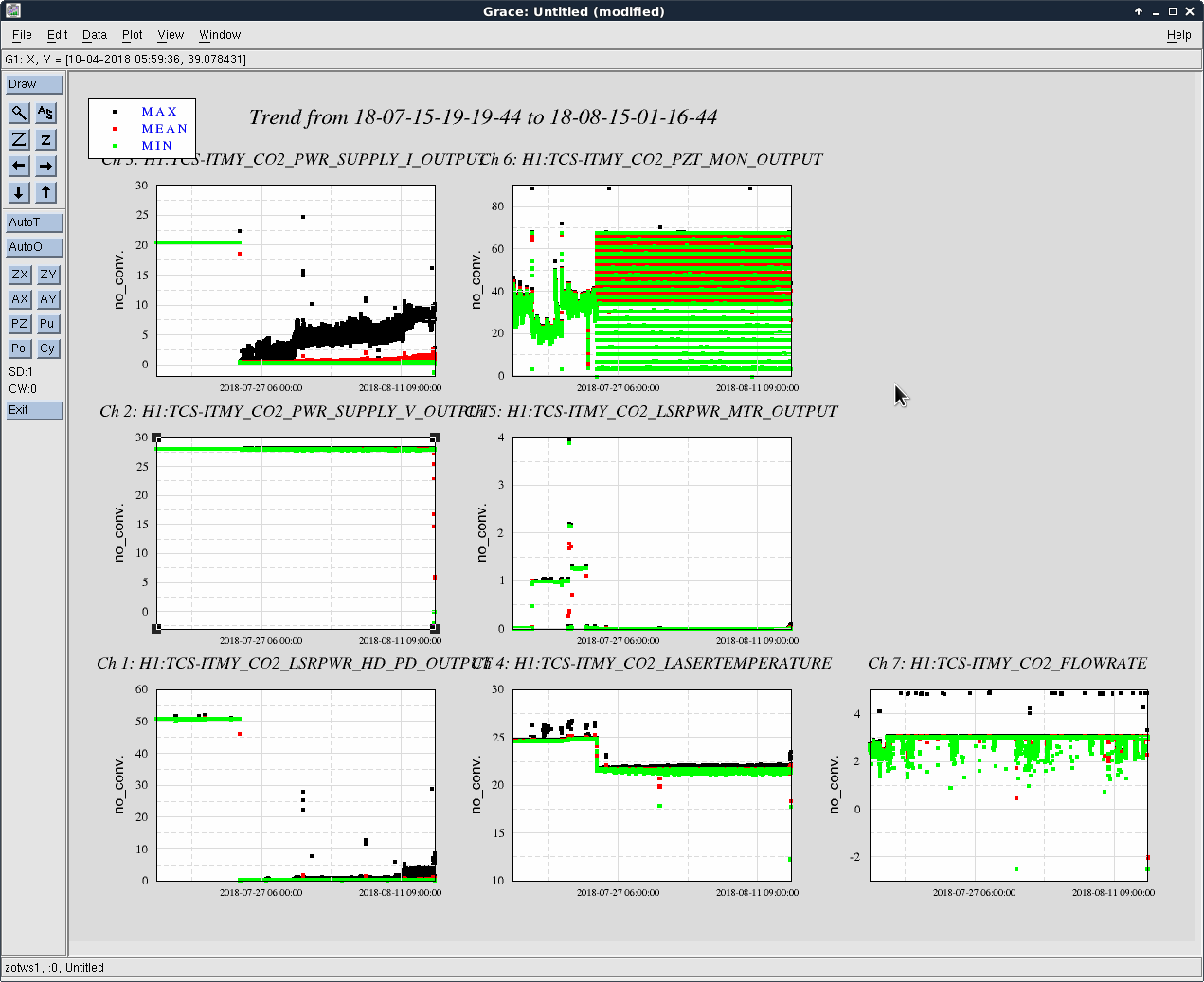
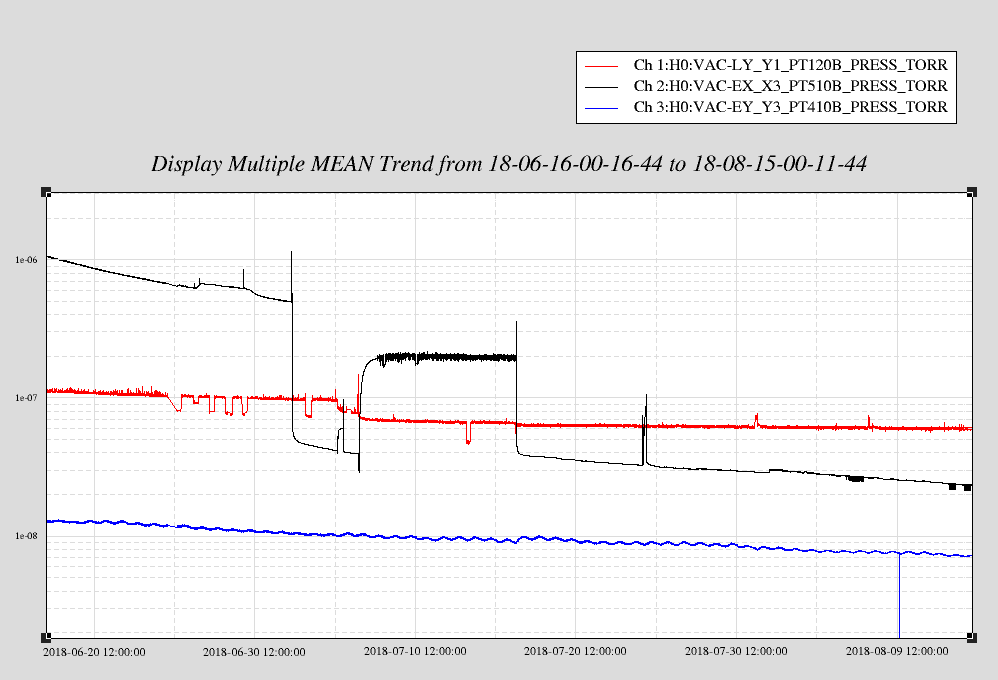
Over the past three days we have been slowly increasing GN2 heater power on CP4 via new variac. Attached is plot since Wed. with variac settings. Today I opened the LN2 draw valve all the way (2-1/8 turns) at Dewar to increase flow but as we know from last time, we bottom out and need the help of the pressure build circuit. I opened that valve 1/2 turn and slowly the Dewar head pressure increased from 12 psig to 16 psig, but I noticed a hissing and vapor coming out of the capped pipe where the LN2 delivery truck connects to. My guess is either the top or bottom fill valves is leaking. I closed the pressure build valve for the weekend. The temperature dip at the end of the plot is likely due to intermediate increased flow and is now recovering. Will monitor over weekend.
Spent the past two days with SAES Getters reps to commission the new high vacuum NEG pump (HV1600-10 NexTorr) installed on BSC6 at EY. We activated the pump yesterday and ran it nominally at 180C overnight. This morning we valved it into the main volume. Attached is ~2day plot. The pressure improved with the NEG+IP valved in. We were scanning the RGA during the transition of valving the pump in today and saw no change in partial pressures immediately. Over hours H2 fell by ~30%. I will attach RGA scans next week.
We tested the 50 m cable this afternoon with the power supply in the adjacent mechanical room. It powered up ok but I found it faulted when I went back later to check on it and the temperature dropped from 180C to 46C. It seemed to turn back on OK. Will check it one more time before I leave. It can run cold, but won't be as effective. The error message read: Global: 202 - Main Line Wrong Voltage. Touch this bar to clean the alarm.
We also activated the CapaciTorr NEG pump on BSC6 while we were out there, but left it valved out. Before activating we pumped out with cart the Ar, etc gasses that built up over months during the EY vent, which caused the pressure to creep to e-4 Torr.
Plot legend: PT-428 is hot cathode (HC) IG on HV NEG housing; PT-410B is CC on BSC10; PT425 is HC on BSC6.
Next time we vent EY, we should expose this pump to pressures at e-4 Torr to test its capacity.
Found PS faulted again. I moved it into VEA and used short cable that is proven to work. May need to send 50 m back or make an adjustment in voltage parameter. Should have tested first before we pulled it. Sorry G.
Note that if the IP cable feels the slightest bump it gives an arcing error on its PS. It will continue to work but can be reset by rebooting.
Gerardo, Patrick Wanted to only restart the screenshots for the vacuum system but ran into trouble and ended up restarting all of them. Kept getting 'Xvfb failed to start' when attempting to run h0_start, but not when running the others. Deleted /tmp/.X99-lock and /tmp/.X6-lock after searching the web for answers, but this did not help. Upon Gerardo's suggestion we compared the scripts. h1_cds_psl_start, h1_sei_start, and h1_sus_start had 'exec xvfb-run -a', but h0start only had 'exec xvfb-run'. I copied h0start to h0start.original_20_apr_2018 and added '-a' to h0start. This allowed it to run, but now all of the screenshots have black rectangles over them.
Ran 'ps -elf | grep Xvfb'. Found two processes: controls@script0:screenshooter 0$ ps -elf | grep Xvfb 0 S controls 1172 1 0 80 0 - 185119 poll_s 2016 ? 18:55:17 Xvfb :6 -screen 0 1600x1200x24 0 S controls 2716 1 20 80 0 - 15987 poll_s 17:04 ? 00:17:22 Xvfb :99 -screen 0 1920x1400x24 -nolisten tcp 0 S controls 14854 31575 0 80 0 - 1918 pipe_w 18:29 pts/0 00:00:00 grep --color=auto Xvfb Killed them both. Got mail in /var/mail/controls. Last line reads: ligo/apps/simlink_webview/update_webview.cron: line 39: 618 Killed matlab -display :6 -logfile $USERAPPS_DIR/cds/common/scripts/webview.log -r 'cd $USERAPPS_DIR/cds/common/scripts/; webview_simlink_update' Looks like I stopped something that I shouldn't have.... But now the original script to run the vacuum screenshots works.
So it appears to be working now, but I may have killed the simulink web screenshots.
Nutsinee, Sheila
This morning Nutsinee and I measured the beam profile arriving in HAM6 from the squeezer, before OM1.
Then we improved the alignment of the 532 beam into the OPO, the power in the 1st order mode is now about 5% of the power in the 00 mode. Nutsinee saved scan data for the 532 beam.
Then we placed an aperture on the far side on HAM6 in the seed path, and removed the translation stage lens from the translation stage. We measured the beam profile in a few locations after ZM1, which seems to be agreeing with the model that Dan and Thomas have. We repalced the lens and checked that the beam still comes back to HAM6 on the OMC side.
Lastly we measured the distance from the beam diverter to the LVEA wall is 137.5 inches.
More details about the measurements are coming soon.
Hoacun, Sheila
Distances from periscope/table/wall/beam diverter:
Measurements of seed mode in chamber:
Conclusion:
The seed waist is 556um at 0.095meters before the beam diverter, or 3 meters from the top periscope mirror.
Checked while Georgia and I were working on EFM. No contact was visible and it seemed to swing freely.
After finally resolving the seg fault issues in guardian (report in full to follow), guardian has been upgraded site-wide and moved to the new production guardctrl host, "h1guardian1".
We've been monitoring the system for the last couple of days and it seems to be working nominally and not showing signs of excess load on the guardian machine. We have seen no seg faults with this new version.
Other than the fix for the seg faults, which turned out to be because pcaspy is not thread safe, there aren't too many changes in this version that users should notice. The main new features have to do with the node management interface:
Other than that there are just various bug fixes and minor improvements.
The new production guardian machine is h1guardian1, which is running Debian 9 with all needed software installed from packages from CDSSoft.
Guardian process supervision on h1guardian1 is now handled by systemd. In particular, it's handled via systemd --user under the "guardian" user account.
The load on this machine seems pretty good:

The above is while running all 124 of the H1 nodes. We'll be monitoring this to make sure load average stays below 100.
Note: this is mostly of no consequence to users, as they'll continue to interact with the supervision system via the guardctrl interface, which has been updated to work with the new system...
The new systemd supervision infrastructure required a new version of guardctrl, which is now installed on all workstations. It works mostly the same as the old version, with some slight changes in some of the subcommands:
jameson.rollins@zotws6:~ 0$ guardctrl -h
usage: guardctrl [-h] [-d] ...
Guardian daemon supervision control interface.
Control guardian daemon processes managed by the site systemd
supervision system.
optional arguments:
-h, --help show this help message and exit
-d, --debug print debug information to stderr
Commands:
help show command help
list list nodes and node subervision state
status print node service status
enable enable nodes
start start nodes
restart restart nodes
stop stop nodes
disable disable nodes
log view node logs
Add '-h' after individual commands for command help.
Node names may be specified with wildcard/globbing, e.g. 'SUS_*'.
A single '*' will act on all configured nodes (where appropriate).
jameson.rollins@zotws6:~ 0$
Known issues:
Guardian node code arching has been temporarily disabled until we're fully confident in the new system. This is because of ownership of the code archives that will need to be moved to the new guardian user. If things are still looking good by next week we will enable the code archives then.
If for any reason there are problems with the new setup, we can easily restore everything to the old configuration on h1guardian0. The new guardctrl interface is backwards compatible with the old h1guardian0 host.
The procedure to restore a single node to the old host would be something like this:
$ guardctrl stop NODE_NAME
$ GUARDCTRL_HOST=h1guardian0 guardctrl start NODE_NAME
To do the same for all nodes, replace "NODE_NAME" with "'*'".
NOTE: if all nodes are moved back to the old host, the CDS admins would need to update the DNS record for "h1guardian" to point to "h1guardian0" instead of "h1guardian1".
Prior to shift: Verbal alarms is crashed Jamie working on guardian 14:47 UTC Jeff B. to end X to reset dust monitor 15:28 UTC Jeff B. back from end X 15:37 UTC Let Advanced Protection Services (APS) through gate 15:48 UTC Peter to PSL enclosure 15:59 UTC Let visitor through gate to see Chandra 16:04 UTC Let Advanced Protection Services (APS) through gate 16:38 UTC Robert to end X to change a setting on electric field injection 16:43 UTC Sheila and Nutsinee to HAM6 to run a beam scan on the squeezer beam 17:05 UTC Robert back from end X 17:12 UTC Greg G. to LVEA 17:24 UTC Robert and Georgia to end X, inchamber work on EFI, check cyropump baffles 17:30 UTC Ed to optics lab, LVEA for property inventory 17:37 UTC Gerardo to LVEA to retrieve power supply to take to end Y 18:03 UTC Peter done in PSL enclosure 18:55 UTC Terry to HAM5 to give equipment to Sheila 18:55 UTC Gerardo to end Y to check on status of HV NEG pump bake 18:59 UTC Robert and Georgia back from end X 19:06 UTC Ken to end X to work on the ceiling above the outside door 20:02 UTC Ken done at end X 20:06 UTC Marc and Elizabeth to LVEA to look for equipment for property inventory 20:14 UTC Marc and Elizabeth done 20:14 UTC Let visitor through gate to see Chandra 20:24 UTC Ed and Elizabeth to end Y for property inventory 20:49 UTC Ed and Elizabeth back from end Y 20:55 UTC Nutsinee back to HAM6 20:56 UTC Elizabeth to LVEA to look for coil of wires 20:58 UTC Corey and Hugh to HAM5 area to prep for vent next week 21:09 UTC Elizabeth back from the LVEA 21:09 UTC Sheila back to HAM6 22:25 UTC Hugh back 22:47 UTC Corey back
I have just completed a full round of model code compilation. This is just a "make" not a "make install" so no target/DAQ/GDS files have been modified.
Before the builds I backed up the H1.ipc file and emptied the file. After the build was completed, I reverted the original H1.ipc file back in case we restart any systems this weekend.
I wrote a script to compare the new DAQ-INI files with what are currently being used. Of the 107 models, 11 have different INI files. This indicates their code has been changed since the last H1 build (calcs, susauxb123, susauxex, susauxey,susauxh34, susetmx, susetmy, susitmx, susitmy, susitmpi, susprocpi)
I'm reviewing these models to see what has changed.
h1susauxb123 and h1pemmx front end systems are both running RCG3.4.2/Gentoo3.0.8 with no current issues.
The problem of the models not starting automatically on reboot has been resolved.
There have been some occasional DAQ issues seen when h1susauxb123 models were started/stopped. Specifically: sometimes when the models are stopped the DAQ data from h1seih16 were glitched (running start_streamers.sh on susaux123 clears this). During some starts of the code the DAQ status for the models h1susopo and h1ascimc were flashing between 0x0 and 0x2000. This was when the susaux models were not starting correctly, has not been seen since.
One surprise, after recompiling h1susauxb123 the resulting DAQ-INI file was different. The file h1susauxb123.mdl has not been modified since 2015, so I suspect some of the common mdl files used by this model have been modified recently.
due to INI file mismatch, DAQ data from h1susauxb123 is currently not correct. I'll revert it back to RCG3.2 soon.
h1susauxb123 is now back at RCG3.2 with good DAQ data. Due to the recent model changes, I did not perform a new rebuild against 3.2 as this would require a DAQ restart. Instead I restored the target directory, the DAQ-INI and the GDS-PAR files from archive. I restored the 3.2 version of awgtpman as well.
While h1susauxb123 was being reverted, DAQ data from h1seih16 was again invalid for a few minutes.
The interruptions in the mx_stream when testing h1susauxb123 may be due to differences in the indexing of the mx_stream slots (i.e. which of the two 10G cards, which of 16 slots on a card) between the old boot server (h1boot0) and new boot server (h1boot1). The relevant files are '/diskless/root/etc/init.d/mx_stream' on both boot servers. On the test stands, there were tests to avoid use of slot 0, because it seemed to be affected when mx_streams in others slots were redone.
Calibration of the field meter does not need knowledge of the input capacitance. With the calibration plates, the electic field on the sense plate is simply E(cal)= V(cal)/d where d is the calibration-sense plate separation. If you want to improve the accuracy you will need to account for the thickness of the copper disk on the sense plate and a few percent error due to the fringing field. The current sensitivity curves are pretty close to the ones measured in the prototype. How did you handle the factor of 2 due to the two plates on each coordinate and the output which is the difference?
We were a little confused about how to calibrate the EFM. It's not such an easy problem as it first seems.Calibration Plate Voltage to Electric Field TF
V_cal refers to the potential difference between the calibration plate and ground. Ground is connected to the body of the EFM. The sensor plate is kept isolated and should be at voltage V_sense = V_cal * d2/(d1 + d2) where d1 is the distance between the cal plate and sensor plate, and d2 is the distance between the sensor plate and the body. If we assume that the electric field E_cal is constant over the entire EFM, then I think we ought to be using the total distance d = d1 + d2 between the calibration plate and body for E_cal = V_cal/d. d1 = 1/2 inch = 1.27 cm, and d2 = 5/8 inch = 1.59 cm, so d ~ 2.86 cm and E_cal/V_cal = 1/d ~ 35.0 (V/m)/V using this method. However, we became concerned about the geometry of the EFM affecting this result. There is a copper disk which connects the sensor plate to the sensor pin, and there are a bunch of large screws between the sensor plate and the body. We decided to compute an "effective distance" using the capacitances we measured between the cal and sense plates (~11pF), and the sense plate and the body (~19pF) via E = Q/(2 A e0), where A is the area of the plates (~0.01 m^2), e0 is the vacuum permittivity, and Q is the charge on the cal plate. Q = C V, so we can recover E/V = C/(2 A e0) = 1/d, so our effective distance d = (2 A e0)/C, where C is the total capacitance between the cal plate and the body (~7pF). Using this method, E/V ~ 38.9 (V/m)/V, not much different than our result from 1/d. This is the number we used to calibrate from V_cal to E_cal. I don't know what value was used for the initial prototype.Differential Amplifier Factor of Two
We did not account for this. We did not understand that the EFM body was grounded, so that the body absorbs the E_cal field by inducing charge on its near face. In the presence of a large external electric field both sense plates will have voltage induced, so we will get twice the response from the EFM differential amplifier circuit. We measured a TF from V_cal to V_out where V_out is the voltage output of the EFM differential amplifier circuit, and got V_out/V_cal ~ 0.8 from 5 kHz down. This should be multiplied by 2 for the V_out/V_external TF.Corrected Plots
Plot 1 is the newly calibrated ambient electric field ASDs recorded by the EFM. Plot 2 is the V_out/V_cal TF.
We (the EFM calibration team) never understood that the sensor plates are virtually grounded by the op-amp inside the EFM until we saw Figure 2 of T1700103. This is why we kept insisting that E = Vcal/d should use d = distance between calibration plate and the EFM body: we thought that the sensor plate was an floating conductor. I fixed our calibration to account for the grounded sensor plates. If I use E = Vcal / d where d is the distance between the cal and sensor plates (d ~ 1/2 inch ~ 1.27 cm), I get. If I account for the copper plate and fringing fields by using our measured capacitance between the calibration plate and sensor plate (C ~ 14.7 pF), I get
(Area A of the plates is ~ 0.01 m^2). This is the E/V calibration I used for the plots below. Also included was our cal volts to EFM output volts measured calibration value of 0.8 V/V. This was multiplied by two to account for the differential response of the EFM to external electric fields, and inverted to give
. Unfortunately, with this corrected calibration our prototype EFM spectrum is worse than we originally thought. In fact, it's worse than your final prototype spectrum from T1700569 by about a factor of two. I am not sure why this should be the case. Rich's LT Spice model has a output voltage noise floor of about 200 nV/rtHz at 200 Hz upward. In your Figure 2 of T1700569, you report a Vn of 110 nV/rtHz, so maybe this result is correct.
The calibration is simpler than you make it. With the cube grounded and the calibration plates mounted on the sense plate, the electric field induced on the sense plate is E = V(cal)/d (with small correction for fringing and the copper plug). If you want to make a model for the calibration to predict the sensitivity that is more complicated and requires knowledge of the capacitances and the potentials between the sense plate and the cube.
Craig, you refer to T1700103 figure 2 to understand the virtual ground. This is not the correct schematic for the implementation of the EFM that was recently built. Each EFM input is simply 10^12 ohms to ground (in parallel with the sense plate capacitance). There is no virtual ground provided actively by the operational amplifier.
Final note on the EFM calibration. Conclusions:After a discussion with Rai and Rich we determined the correct calibration is
where
is the driven voltage on the cal plate,
is the induced voltage on the sense plate, and
is the distance between cal and sense plate. We need to know the voltage induced on the sense plate. To do this I simulated the circuit in the first picture. Again, we measured the capacitance between the cal and sense plate to be 14.7 pF, while the capacitance between the sense and body was 19 pF. I found
above 10 mHz. Solving for
gives the result above. The final plot is the correctly calibrated ambient electric field spectrum.
I am very sorry for having generated all this confusion. The sense plate is not a virtual ground, that was the case in earlier circuits. In this
circuit the proper formulation for the electric field on the sense plate from the calibration plate is
V(cal) - V(sp) V(cal) C(cal-sp)
E(cal) = ---------------- = ---------------------------------- So, the calibration field is smaller than in the case for the sense plate held
d(cal-sp) d(cal-sp)(C(cal-sp)+C(sp-allelse))
at ground potential which makes the field meter more sensitive. Which is what you found. The error is purely mine and not Rich Abbott's or any
of the people in the electronics group. It comes from my not thinking about the calibration again after the circuit was changed from one type
to another in my lab.